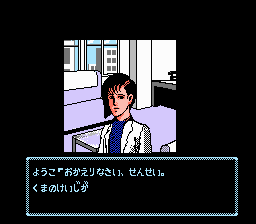
Tantei Jinguuji Saburou - Shinjuku Chuuou Kouen Satsujin Jiken (Japan) (Rev 1) (Virtual Console)
Tantei Jinguuji Saburou - Shinjuku Chuuou Kouen Satsujin Jiken (Japan) (Rev 1) (Virtual Console): FDS Adventure
Tantei Jinguuji Saburou - Shinjuku Chuuou Kouen Satsujin Jiken is a detective adventure game for the Famicom Disk System, originally released in Japan by Data East. This version is Rev 1, a minor bugfix or revision of the original releases, later made available on the Virtual Console. The game follows private eye Jinguuji Saburou as he investigates a murder case in Shinjuku Central Park, typical of the visual novel-style adventure genre popular on Japanese home computers at the time. It is a Japan-exclusive title, with all text in Japanese, and no official translation exists.
You play as Jinguuji Saburou, navigating through crime scenes, interrogating witnesses, and piecing together clues to solve the murder. Interaction is menu-driven: you select commands like "Talk," "Look," "Use," and "Move" from a list, applying them to highlighted objects or characters. The game relies on logical deduction and careful note-taking; progress is made by exhausting dialogue options and examining every screen. There is no combat or action elements, just pure puzzle-solving and story progression.
For fans of classic text adventures or detective fiction, this title is a fascinating piece of adventure game history, though its Japanese-only interface makes it a tough recommendation without language support. Compared to earlier FDS adventures like Portopia Renzoku Satsujin Jiken, it offers a more polished presentation and a tighter murder mystery. If you can get past the language barrier or use a fan translation, it holds up as a well-crafted whodunit with atmosphere and clever puzzle design.
How to Play Tantei Jinguuji Saburou - Shinjuku Chuuou Kouen Satsujin Jiken (Japan) (Rev 1) (Virtual Console) Online
Getting Started
When you boot the game, you are dropped into the investigation right away. A text window at the bottom of the screen displays the current location and options. Since the entire game is in Japanese, you may need a reference or guide to understand the menus. The primary verb options are presented in a list; use the D-pad to highlight an action and press X (A button) to select it. Pressing S (B button) will cancel or go back to a previous menu. The first step is to examine the crime scene by selecting "調べる" (Look) on various objects. Listen for sound cues that indicate something important.
The core loop involves moving between screens, talking to characters, and collecting key items or information. Use the Select button (V) to open the inventory or check your notes if needed. The game expects you to try different command combinations; don't be afraid to experiment. Some puzzles require using an item on a specific object or person. Because the game is menu-based, you must be thorough and systematic. There is no time pressure, so take your time to understand the logic of each situation.
If you get stuck, remember that the game's progression is linear in terms of story, but you can revisit earlier locations. If you cannot read Japanese, consider following a written walkthrough or using a fan translation patch. The Virtual Console release includes the exact same content as the original FDS disk, so expect no hints or in-game help beyond the manual.
Tantei Jinguuji Saburou - Shinjuku Chuuou Kouen Satsujin Jiken (Japan) (Rev 1) (Virtual Console) Keyboard Controls
Controls
- Arrow Keys: D-Pad / Movement
- X: A button (jump / confirm)
- S: B button (run / attack / cancel)
- Enter: Start / Pause
- V: Select



Comments (0)