The game loads when you press Play · press “Play Now” inside the game if it asks.
Solomon no Kagi (Japan) (Disk Writer)
Solomon no Kagi
Solomon no Kagi Overview
- Famicom Disk System
- Puzzle
- 5· 0 votes
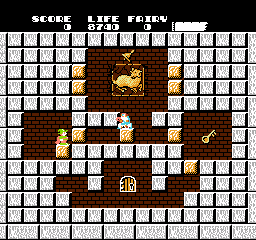
What you actually do in Solomon no Kagi is manipulate your surroundings to reach that key and then the exit. Your character, a nimble wizard named Dana, can conjure blocks out of thin air and also destroy existing ones by touching them while holding the A button. This block play is the core of every puzzle: you might build a staircase to climb higher, seal off an enemy's path, or remove a wall to uncover a shortcut. Enemies like ghosts and dragons roam each room, and you can dispatch them by trapping them in blocks or by shooting fireballs (which you earn by collecting special items). The game is purely about navigating these confined spaces, and the order of room progression is fixed. There is no story between stages beyond the simple premise of escaping a cursed castle.
For a retro game enthusiast, Solomon no Kagi holds up because of its tight, inventive puzzle design that still feels satisfying today. It stands alongside other classic block-based brain-teasers like Lode Runner or even Nintendo's own Mario Bros. knockoffs, but its one-screen challenge structure makes it a perfect pick-up-and-play title. The difficulty ramps up sharply - later rooms require precise timing and block management - which may frustrate casual players but rewards persistence. Since the FDS version never left Japan, playing it online is one of the few ways to experience the exact disk release with its original loading screens and palette. If you enjoy methodical puzzle-platformers that demand you think before you act, this is a gem worth seeking out.
GAME INFO
- Platform
- Famicom Disk System
- Genre
- Puzzle
- Released
- 1986
- Players
- 1
- Region
- Japan
- Version
- Disk Writer
More Solomon no Kagi Games
Ready for another round? Explore more Solomon no Kagi games and console editions. Choose a game below to play it on its own page.

How to play Solomon no Kagi online
Getting started
Solomon no Kagi is a puzzle-platformer where you guide the wizard Dana through a castle of locked rooms. When you start, you'll see a title screen in Japanese. Press the Enter key to begin (the Disk Writer version may show a brief loading screen). The main menu options are minimal: likely just 'Start' and 'Continue' if you had a saved game. Since the game is in Japanese, the text won't be readable if you don't know the language, but the gameplay is entirely icon-driven. The first room is straightforward: you need to reach the key (a glowing yellow item) and then touch the exit door to advance. Use the Arrow Keys to move and X to jump. Press S to create a block in front of you (or destroy one if you hold S while touching a block). Experiment with this mechanic to get a feel for how blocks appear and disappear.
The core loop in every room is the same: find a path to the key, grab it, then navigate to the exit. You'll encounter enemies that move in fixed patterns. You can defeat them by creating a block above them (which kills them when it lands) or by shooting fireballs - but fireballs are only available after collecting a special item shaped like a flame. Blocks are your primary tool: you can stack them to climb higher, fill gaps to cross pits, or block off enemy routes. There is no timer, so take your time to plan. If you die, you restart the current room, not the whole game. The game saves your progress on the FDS disk (in the emulator, it will prompt you to create a save file when you press the right button at the end of a stage). Just focus on one room at a time, and you'll get the hang of it.
CONTROLS
Controls
- Arrow Keys: D-Pad / Movement
- X: A button (jump / confirm)
- S: B button (run / attack / cancel)
- Enter: Start / Pause
- V: Select
Solomon no Kagi FAQ
Which regions was Solomon no Kagi released in?
Solomon no Kagi was released exclusively in Japan for the Famicom Disk System. It never saw an official release in North America or Europe on the FDS. The later NES version, Solomon's Key, did come out internationally, but that cartridge release is not identical to this disk version.
What makes Solomon no Kagi stand out among Famicom Disk System titles of its era?
Its core mechanic of creating and destroying blocks at will was a fresh twist on the puzzle-platformer formula. Most other FDS games focused on scrolling shooters or adventure titles, so this screen-by-screen brain-teaser felt more like a board game. The tight puzzle design and high difficulty also gave it a lasting reputation among hardcore players.
Is Solomon no Kagi considered easy to pick up or challenging?
It is notoriously challenging, especially in later stages. The early rooms are gentle introductions to the block mechanics, but the difficulty ramps up quickly with more enemies and tighter navigation requirements. Expect trial and error, and sometimes you'll need to restart a room many times to figure out the correct sequence.
You may also like
All Famicom Disk System games Aki to Tsukasa no Fushigi no Kabe
 Yume Koujou - Doki Doki Panic
 Bishoujo Hanafuda Club Vol.2 - Koikoi Bakappana Hen
 Bishoujo Shashinkan - Studio Cut
 Bishoujo Sexy Slot
 Bishoujo Hanafuda Club Vol.1 - Oichokabu Hen
 Transformers - The Headmasters
 Bakutoushi Patton-kun
 Aliens - Alien 2
 Tenshitachi no Houkago
 Backgammon
 Chitei Tairiku Ordola
GAME INFO
- Platform
- Famicom Disk System
- Genre
- Puzzle
- Released
- 1986
- Players
- 1
- Region
- Japan
- Version
- Disk Writer
COMMENTS (0)
No comments yet. Be the first to share your thoughts.