The game loads when you press Play · press “Play Now” inside the game if it asks.
Roger Rabbit (Japan)
Roger Rabbit
Roger Rabbit: FDS Adventure
- Famicom Disk System
- Adventure
- 5· 0 votes
GAME INFO
- Platform
- Famicom Disk System
- Genre
- Adventure
- Released
- 1989
- Players
- 1
- Region
- Japan
How to play Roger Rabbit online
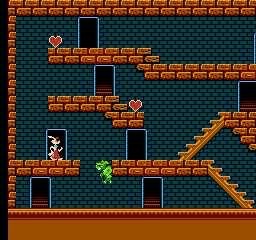
Getting started: When you start Roger Rabbit (Japan), you'll see a title screen in Japanese. Press Start to begin the game. You control Roger Rabbit in a side-scrolling environment, moving left and right with the D-Pad and jumping with the A button. The core loop involves exploring each area to find items and interact with characters by pressing the B or Y buttons. Some objects can be picked up and used elsewhere to solve puzzles.
The game is a mix of adventure and action. You'll need to talk to characters (approach and press the action button) to receive hints or items. The inventory is handled via Select - press it to open the menu, then use the shoulder buttons to cycle through items. Combine items if needed. Watch out for hazards like enemies or traps; you can attack with the B button. Since the menus are in Japanese, memorizing the layout helps - for example, the top option usually means 'Talk' or 'Use'. If you get stuck, try using every item on every object or character.
Because this is the FDS version, saving is handled by the disk system. Make sure to follow on-screen prompts to save your progress at certain points. The game is relatively short but can be tricky without understanding the language; patience and experimentation are key.
CONTROLS
Controls
- Arrow Keys: D-Pad / Movement
- X: A button (jump / confirm)
- S: B button (run / attack / cancel)
- Enter: Start / Pause
- V: Select
Roger Rabbit FAQ
Who developed Roger Rabbit?
Rare developed the original NES version, and likely handled the Famicom Disk System port as well, though official credit for the FDS version is not widely documented.
What type of game is Roger Rabbit?
It is an action-adventure game that combines graphic adventure puzzle-solving with standard platforming and combat. The gameplay emphasizes exploration and item use rather than pure action.
Is there anything iconic or memorable about Roger Rabbit?
The game stands out for its ambitious blend of point-and-click adventure design with console action, and for being one of the few official video games based on the film. The FDS version retains the same core but uses the disk format, adding a layer of novelty for collectors.
You may also like
All Famicom Disk System games Aki to Tsukasa no Fushigi no Kabe
 Yume Koujou - Doki Doki Panic
 Bishoujo Hanafuda Club Vol.2 - Koikoi Bakappana Hen
 Bishoujo Shashinkan - Studio Cut
 Bishoujo Sexy Slot
 Bishoujo Hanafuda Club Vol.1 - Oichokabu Hen
 Transformers - The Headmasters
 Bakutoushi Patton-kun
 Aliens - Alien 2
 Tenshitachi no Houkago
 Backgammon
 Chitei Tairiku Ordola
GAME INFO
- Platform
- Famicom Disk System
- Genre
- Adventure
- Released
- 1989
- Players
- 1
- Region
- Japan
COMMENTS (0)
No comments yet. Be the first to share your thoughts.