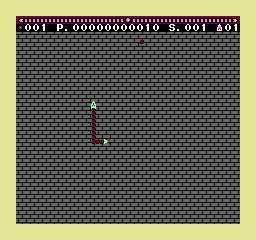
The game loads when you press Play · press “Play Now” inside the game if it asks.
Replicart (Japan)
Replicart
About Replicart
- Famicom Disk System
- Puzzle
- 5· 0 votes
GAME INFO
- Platform
- Famicom Disk System
- Genre
- Puzzle
- Released
- 1987
- Region
- Japan
How to play Replicart online
Getting Started
First, load the game in your emulator or FDS hardware. Since Replicart is a Japanese-only title, the menu screens are entirely in Japanese. If you don't read the language, look for visual cues or try pressing Start to see if you can skip straight to gameplay. The disk may require a short loading sequence before the title screen appears.
Once in the game, you'll see a playfield with some objects. Use the D-pad to move your cursor or character around. Experiment with the A and B buttons to interact with tiles or pieces. The goal appears to be replicating a given pattern or completing a puzzle by arranging elements correctly. Pay attention to any on-screen prompts or feedback, like beeps, to know if you're on the right track.
There is no pause option mentioned, but pressing Start might bring up a menu. If you get stuck, resetting the emulator can restart the game. The core loop involves trial and error - try different actions to see what triggers progress. Since the game is simple by modern standards, you should figure out the rules within a few minutes of play.
CONTROLS
Controls
- Arrow Keys: D-Pad / Movement
- X: A button (jump / confirm)
- S: B button (run / attack / cancel)
- Enter: Start / Pause
- V: Select
Replicart FAQ
Is Replicart exclusive to Famicom Disk System or did it appear on other systems?
Replicart appears to have been released only for the Famicom Disk System in Japan. No evidence suggests ports to other platforms or regions.
Is Replicart an official release, a fan hack, a prototype, or another kind of build?
Information is not widely documented, but the game is generally considered an official commercial release for the Famicom Disk System. No confirmed status as a hack, prototype, or homebrew exists in common databases.
Roughly how long does it take to finish Replicart?
Completion time is not well documented. Given its puzzle genre and simple design, a single playthrough likely takes under 30 minutes once you understand the mechanics.
You may also like
All Famicom Disk System games Aki to Tsukasa no Fushigi no Kabe
 Yume Koujou - Doki Doki Panic
 Bishoujo Hanafuda Club Vol.2 - Koikoi Bakappana Hen
 Bishoujo Shashinkan - Studio Cut
 Bishoujo Sexy Slot
 Bishoujo Hanafuda Club Vol.1 - Oichokabu Hen
 Transformers - The Headmasters
 Bakutoushi Patton-kun
 Aliens - Alien 2
 Tenshitachi no Houkago
 Backgammon
 Chitei Tairiku Ordola
GAME INFO
- Platform
- Famicom Disk System
- Genre
- Puzzle
- Released
- 1987
- Region
- Japan
COMMENTS (0)
No comments yet. Be the first to share your thoughts.