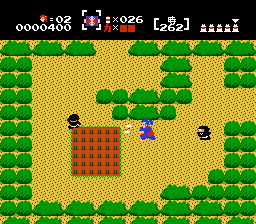
Nazo no Murasamejou (Japan) (Wii and Wii U Virtual Console)
Getting to Know Nazo no Murasamejou (Japan) (Wii and Wii U Virtual Console)
Nazo no Murasamejou is a top-down action-adventure game originally released for the Famicom Disk System in 1986, exclusively in Japan. Developed and published by Nintendo, it puts you in the role of a samurai named Takamaru who must defend his homeland from an ancient evil. This version is the official Wii and Wii U Virtual Console re-release, making it available to modern players through emulation. The game is often noted for its feudal Japanese setting and was a precursor to Nintendo's later adventure titles, though it never saw an official Western release.
How to Play Nazo no Murasamejou (Japan) (Wii and Wii U Virtual Console) Online
To start, press Enter to bring up the title screen. Use the D-Pad to select "はじめる" (Hajimeru / Start) and press X to confirm. The game uses Japanese text throughout, so if you cannot read it, you may need to rely on trial and error. Once inside, you control Takamaru from a top-down perspective. Move with the Arrow Keys, press S to attack with shurikens or use items, and press X to jump. Your goal is to explore the sprawling Murasame Castle, defeat its many guardians, and reach the final boss.
The core loop involves clearing rooms of enemies, collecting power-ups like the tanuki mask (which makes you invisible) or the lightning scroll (which rains bolts), and finding keys to unlock doors. You have a limited number of lives and no continues, so caution is key. If you die, you restart from the beginning of the castle wing you were in. On the Virtual Console, you can use save states to save progress more easily. The game is fast-paced and demands precise movement and timing to survive the relentless enemy onslaught.
Nazo no Murasamejou (Japan) (Wii and Wii U Virtual Console) Keyboard Controls
Controls
- Arrow Keys: D-Pad / Movement
- X: A button (jump / confirm)
- S: B button (run / attack / cancel)
- Enter: Start / Pause
- V: Select



Comments (0)