The game loads when you press Play · press “Play Now” inside the game if it asks.
Kick and Run (Japan)
Kick and Run
Kick and Run Overview
- Famicom Disk System
- Sports
- 5· 0 votes
GAME INFO
- Platform
- Famicom Disk System
- Genre
- Sports
- Released
- 1987
- Players
- 1-2
- Region
- Japan
How to play Kick and Run online
Getting Started
Upon booting Kick and Run via the FDS emulator, you'll see a title screen in Japanese. Press Start to proceed to a menu where you choose between one-player (1P) and two-player (2P) modes. Use the D-pad to highlight your selection and press the X button (A) to confirm. The game then begins a match against the CPU or a second human player.
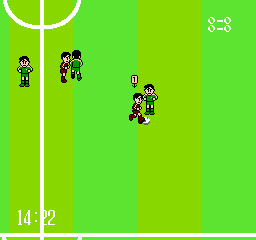
The core loop is simple: you control a player on a green pitch. Your goal is to kick the ball into the opponent's net while preventing them from scoring. Use the D-pad to move your player, the S button to kick the ball when close, and the X button to jump (useful for headers or to avoid sliding tackles). The match is timed; the team with the most goals wins. There are no complex strategies or power-ups, just pure arcade soccer action.
Since all menus and instructions are in Japanese, navigation can be tricky if you don't read the language. The main menu options are usually numbered or written in katakana. If you get stuck, try pressing Select and then Start to cycle through options. The default match length is short, so games are quick and ideal for a few minutes of play.
CONTROLS
Controls
- Arrow Keys: D-Pad / Movement
- X: A button (jump / confirm)
- S: B button (run / attack / cancel)
- Enter: Start / Pause
- V: Select
Kick and Run FAQ
What makes Kick and Run stand out among Famicom Disk System titles of its era?
One of the early soccer games on the FDS, it uses simple but solid ball physics and a top-down view that was less common at the time. Its disk-based format allowed for longer matches and better audio than cartridge equivalents.
Does Kick and Run have a multiplayer or co-op mode?
Yes, it supports two-player versus mode, allowing a second player to join using the same keyboard or controller. There is no cooperative play; it is strictly competitive.
Is there anything iconic or memorable about Kick and Run?
The game is remembered for being a straightforward, no-frills soccer simulation that predates more famous console soccer series. Its Japanese-only release and limited popularity make it a curiosity for FDS collectors.
You may also like
All Famicom Disk System games Aki to Tsukasa no Fushigi no Kabe
 Yume Koujou - Doki Doki Panic
 Bishoujo Hanafuda Club Vol.2 - Koikoi Bakappana Hen
 Bishoujo Shashinkan - Studio Cut
 Bishoujo Sexy Slot
 Bishoujo Hanafuda Club Vol.1 - Oichokabu Hen
 Transformers - The Headmasters
 Bakutoushi Patton-kun
 Aliens - Alien 2
 Tenshitachi no Houkago
 Backgammon
 Chitei Tairiku Ordola
GAME INFO
- Platform
- Famicom Disk System
- Genre
- Sports
- Released
- 1987
- Players
- 1-2
- Region
- Japan
COMMENTS (0)
No comments yet. Be the first to share your thoughts.