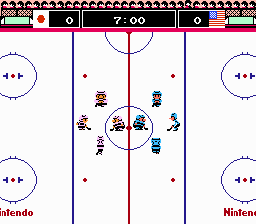
The game loads when you press Play · press “Play Now” inside the game if it asks.
Ice Hockey (Japan)
Ice Hockey
Ice Hockey Overview
- Famicom Disk System
- Sports
- 5· 0 votes
GAME INFO
- Platform
- Famicom Disk System
- Genre
- Sports
- Publisher
- Nintendo
- Released
- 1988
- Players
- 1-2
- Region
- Japan
How to play Ice Hockey online
Getting Started
When you boot up Ice Hockey on the Famicom Disk System, you'll see a title screen followed by a menu to select game mode. The Japanese menus are simple enough to navigate: the top option is usually one-player mode, the next is two-player versus. Use the arrow keys to highlight your choice and press X (A button) to confirm.
The core objective is to score more goals than your opponent within the time limit. You control a skater with the D-pad to move around the rink, press B (S key) to pass or shoot the puck, and press A (X key) to switch control to the player closest to the puck. The puck physics are basic but require timing to intercept passes and aim shots at the net. Each team has five players including a goalie, who moves automatically but can be manually controlled when you're close to your own net.
Matches are short and fast-paced, with no complex rules like offside or icing. The game offers a choice between three different team types (strong/slow, balanced, fast/weak) before the match begins. As a Japanese FDS release, there's no language barrier beyond the menus, and the gameplay is intuitive once you get used to the two-button controls.
CONTROLS
Controls
- Arrow Keys: D-Pad / Movement
- X: A button (jump / confirm)
- S: B button (run / attack / cancel)
- Enter: Start / Pause
- V: Select
Ice Hockey FAQ
Does Ice Hockey have a multiplayer or co-op mode?
Yes, the game includes a two-player versus mode where two people can compete head-to-head. There is no co-op mode; it's strictly competitive against another human or the AI.
Which regions was Ice Hockey released in?
Ice Hockey was released in Japan for the Famicom Disk System, and later in North America and Europe for the Nintendo Entertainment System. The Japanese version uses the proprietary disk format and is identical in gameplay to the NES release.
In what year was Ice Hockey originally released?
The original release year is 1988, first appearing on the Famicom Disk System in Japan. The NES versions followed in the same year for other regions.
You may also like
All Famicom Disk System games Aki to Tsukasa no Fushigi no Kabe
 Yume Koujou - Doki Doki Panic
 Bishoujo Hanafuda Club Vol.2 - Koikoi Bakappana Hen
 Bishoujo Shashinkan - Studio Cut
 Bishoujo Sexy Slot
 Bishoujo Hanafuda Club Vol.1 - Oichokabu Hen
 Transformers - The Headmasters
 Bakutoushi Patton-kun
 Aliens - Alien 2
 Tenshitachi no Houkago
 Backgammon
 Chitei Tairiku Ordola
GAME INFO
- Platform
- Famicom Disk System
- Genre
- Sports
- Publisher
- Nintendo
- Released
- 1988
- Players
- 1-2
- Region
- Japan
COMMENTS (0)
No comments yet. Be the first to share your thoughts.