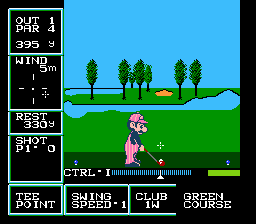
Golf - US Course (Japan) (DV 2) (Disk Writer)
Inside Golf - US Course (Japan) (DV 2) (Disk Writer)
Golf - US Course (Japan) (DV 2) (Disk Writer) is a version of Nintendo's original golf simulation released for the Famicom Disk System (FDS) exclusively in Japan. This particular build is labeled with 'DV 2' and 'Disk Writer', indicating it was distributed through Nintendo's Disk Writer kiosks rather than sold at retail. It's the same basic game but repackaged for the write-once disk system that let players copy titles from store kiosks. The sport sim genre was a staple on early Nintendo hardware, and this entry offers a straightforward take on golf targeting FDS owners.
The player takes on the role of a golfer navigating an 18-hole course modeled after real US layouts. Before each shot you select a club, set the aim direction, and then time a power swing using the series' iconic three-click meter: one press starts the power bar moving, a second sets strength, and a third clicks the ball's contact. Wind conditions are displayed and terrain elevation is handled via a simple grid. Menus are entirely in Japanese, so first-timers may need to memorize the options for club selection and stroke counting. The core loop is traditional golf: drive from the tee, approach the green, putt, and tally your score against par.
Today this FDS variant is worth a look for two reasons: it's a clean example of Nintendo's early sports design and it shows the Disk Writer distribution model in action. Compared to the NES Golf cartridge (released in North America) the FDS version feels nearly identical mechanically, though the disk format allowed for easier course swapping. The 'US Course' name is a simple differentiator rather than a huge gameplay shift. For collectors and emulation enthusiasts it scratches a niche - simple, honest golf that doesn't overstay its welcome. Just keep in mind the Japanese menus and lack of modern depth.
How to Play Golf - US Course (Japan) (DV 2) (Disk Writer) Online
Getting Started
First thing you'll see is the title screen with Japanese text. Press Start to enter the main menu. Use the D-Pad to highlight options: the top option is to start a new game, the second is password input (the FDS version saves progress via on-screen passwords). Pick a course - there's only one here - and you're on the first tee.
The swing mechanic is the heart of the game. Press A to start the power bar moving up; press A again to stop it - the higher it is, the stronger the shot. Then a second bar appears for accuracy; press A a third time to lock the contact point. A perfect center hit gives the best direction and distance. Wind direction is shown at the bottom; adjust your aim accordingly using the D-Pad. Club selection is done before the swing by pressing Up/Down on the D-Pad while in the aiming screen.
Putting works the same but with a much shorter power bar. Green slopes are indicated by the grid lines. If you hook or slice the ball, correct for it by aiming slightly opposite. Since all menus are in Japanese, you might want to experiment in a practice round first. The game keeps your score automatically; aim for par or better on each hole.
Golf - US Course (Japan) (DV 2) (Disk Writer) Keyboard Controls
Controls
- Arrow Keys: D-Pad / Movement
- X: A button (jump / confirm)
- S: B button (run / attack / cancel)
- Enter: Start / Pause
- V: Select





Comments (0)