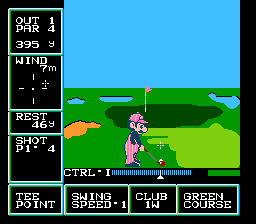
Golf - US Course (Japan) (DV 1)
Golf - US Course (Japan) (DV 1) on FDS
Golf - US Course is a sports simulation for the Famicom Disk System, originally released in 1987 by Nintendo in Japan. This disk version, labeled DV 1, offers a US-style course with different hole layouts compared to the standard Japanese course found in the earlier Golf cartridge. It's an official first-party title, not a hack or homebrew, and was distributed on Nintendo's magnetic disk format exclusively in Japan. The game uses the FDS's ability to store one course per disk side, with this side presenting the US Course design.
Players control a golfer through 18 holes of play. The core loop involves selecting a club, aiming the shot using the D-pad, setting power with a moving meter (press A to stop the meter at the desired power), then pressing A again to swing. Wind direction and speed are displayed and affect ball trajectory. The terrain includes fairways, roughs, sand traps, and water hazards, and the ball's lie influences the available club and shot power. Scoring follows standard golf rules, with a par for each hole. The game lacks any story or extra modes - only a single-player round with no multiplayer or co-op options.
This title is a straightforward golf experience that showcases early NES sports design on the Famicom Disk System. Its appeal today lies in its historical value as a Japan-exclusive variant of a classic Nintendo sports game, offering a different course layout that collectors and retro enthusiasts may want to try. Compared to later golf games it's simple - no course editor or tournament modes - but the clean mechanics and responsive controls make it a competent pick-up-and-play title. If you enjoy minimalistic sports simulations from the 8-bit era, this is worth a few rounds, especially if you're exploring the FDS library.
How to Play Golf - US Course (Japan) (DV 1) Online
To begin playing Golf - US Course, insert the disk (the emulator loads the ROM automatically). After the title screen, you'll be presented with a menu in Japanese. Use the D-pad to navigate and press X (A button) to select "1 PLAYER" (the top option). The game will then display the first hole. You start on the tee box with a driver selected by default.
The core gameplay loop: aim your shot using the D-pad (left/right to adjust direction, up/down to move the aim marker slightly), then press X to begin the power swing. A power meter appears on the right side - press X again when the bar reaches your desired power. A third press of X (or depending on the version, a second press) executes the swing with the chosen power. For approach shots on the green, you can angle the ball's trajectory by pressing up or down on the D-pad after the power meter appears, but this is refined through practice.
Important tips: Wind affects your shot significantly, so compensate by aiming opposite to the wind direction. Always check the terrain before choosing a club - if the ball is in the rough or sand, your club selection and power are reduced. To putt, the game switches to a top-down view of the green; aim carefully and read the slight contour lines. Since the menus are in Japanese, the only options you need are the pre-round club selection (accessed by pressing V/Select before a shot) and the main menu. Press Enter (Start) to confirm your shot or skip camera views. There is no save function - each round is a fresh playthrough.
Golf - US Course (Japan) (DV 1) Keyboard Controls
Controls
- Arrow Keys: D-Pad / Movement
- X: A button (jump / confirm)
- S: B button (run / attack / cancel)
- Enter: Start / Pause
- V: Select





Comments (0)