CHOOSE A VERSION
3 versions · same consoleChoose an original release, regional version, revision, bootleg or clearly labelled ROM hack/mod, then press Play. Hacks may change the gameplay. Switching versions restarts the player.
Selected: Default · Japan · Japan
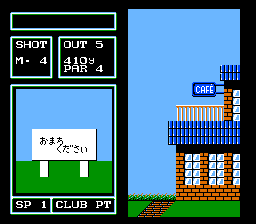
The game loads when you press Play · press “Play Now” inside the game if it asks.
Golf - Japan Course (Japan)
Golf - Japan Course
Getting to Know Golf - Japan Course
- Famicom Disk System
- Sports
- 5· 0 votes
You play a round of golf across eighteen holes. The view is top-down, with a simple interface for selecting clubs, adjusting aim, and setting swing power. A meter appears for timing your shot - press the button once to start the power gauge, again to set it, and a third time for accuracy. The wind and terrain affect ball trajectory, so you have to factor those in. After each hole, the score updates, and you keep playing until all holes are done. There's no story or extra modes - just the pure mechanics of the sport.
Golf - Japan Course is worth checking out if you appreciate early console sports games or want to see how Nintendo handled golf before Mario Golf existed. It's simple and a bit stiff by modern standards, but the course design and physics hold up reasonably for 1984. If you're into retro sports sims or collecting FDS exclusives, this one fits nicely. Just don't expect anything beyond basic golf - it does exactly what it says on the label.
GAME INFO
- Platform
- Famicom Disk System
- Genre
- Sports
- Players
- 1
- Region
- Japan
How to play Golf - Japan Course online
When the game boots, you'll see a title screen with the course name in Japanese. Press Start to begin. The menu is entirely in Japanese, but the interface is straightforward: use the D-Pad to highlight options and press X to confirm. You choose your club, aim direction, and then use the swing meter. The game cycles through your clubs automatically as distance changes, but you can manually select using the D-pad left/right on the club display.
The core loop is simple: tee off from the starting point, then hit approach shots toward the green, and finally putt into the hole. After each stroke, the game recalculates your position and shows a new overhead view. Pay attention to the wind indicator at the top of the screen - it affects your ball's flight. If your shot goes into the rough or a bunker, you'll need to adjust your club and power accordingly. There are no mulligans or practice swings, so each shot counts.
Since this is the Japan Course version, the layout differs from the standard Golf cartridge. Holes are mostly flat but have water hazards and trees. If you get stuck in Japanese menus, remember that the top option on the swing screen is usually the club selection, and pressing B cancels a choice. It's a short round - 18 holes can take about 20 to 30 minutes, depending on your skill.
CONTROLS
Controls
- Arrow Keys: D-Pad / Movement
- X: A button (jump / confirm)
- S: B button (run / attack / cancel)
- Enter: Start / Pause
- V: Select
Golf - Japan Course FAQ
Who developed Golf - Japan Course?
Nintendo developed and published this game. It is a first-party title, part of their early sports lineup for the Famicom Disk System.
Roughly how long does it take to finish Golf - Japan Course?
A full 18-hole round takes about 30 to 45 minutes, depending on how many strokes you take. There is no save feature, so you need to complete the round in one session.
Does Golf - Japan Course have a multiplayer or co-op mode?
No, this is a single-player only game. There is no versus mode, hot-seat multiplayer, or cooperative play. Each round is played alone.
You may also like
All Famicom Disk System games Aki to Tsukasa no Fushigi no Kabe
 Yume Koujou - Doki Doki Panic
 Bishoujo Hanafuda Club Vol.2 - Koikoi Bakappana Hen
 Bishoujo Shashinkan - Studio Cut
 Bishoujo Sexy Slot
 Bishoujo Hanafuda Club Vol.1 - Oichokabu Hen
 Transformers - The Headmasters
 Bakutoushi Patton-kun
 Aliens - Alien 2
 Tenshitachi no Houkago
 Backgammon
 Chitei Tairiku Ordola
GAME INFO
- Platform
- Famicom Disk System
- Genre
- Sports
- Players
- 1
- Region
- Japan
COMMENTS (0)
No comments yet. Be the first to share your thoughts.