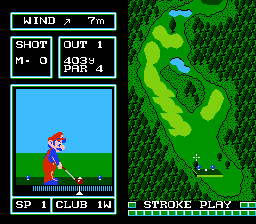
Golf - Japan Course (Japan) (Prize Card)
Golf - Japan Course (Japan) (Prize Card) on FDS
Golf - Japan Course (Japan) (Prize Card) is a sports title for the Famicom Disk System, released exclusively in Japan as a promotional item. Nintendo published the game, and it belongs to the early wave of FDS software that brought simple, accessible golf simulation to home consoles. The 'Prize Card' designation indicates it was distributed as part of a contest or giveaway, using the disk card format rather than a standard retail disk.
You control a golfer navigating a top-down course, selecting clubs and aiming shots with precision. The core loop involves reading the wind direction, choosing the right club, and timing your swing with a power meter. Each hole presents hazards like bunkers and water, and the goal is to complete 18 holes in as few strokes as possible. The Japan Course offers a specific layout of greens and fairways, distinct from other Golf versions on the system.
For modern players, this title is a straightforward, no-frills golf game that captures the pick-up-and-play ethos of the 8-bit era. It's worth trying if you enjoy retro sports sims or want to experience a piece of Famicom promotional history. The gameplay is simple but can be addictive, and the Japan Course provides enough variety to keep you swinging. Just don't expect complex mechanics or deep customization; it's all about the basics done well.
How to Play Golf - Japan Course (Japan) (Prize Card) Online
When you start Golf - Japan Course, you will see a title screen in Japanese. Press Start to begin a round. You will be placed on the first tee. The game uses a top-down view of the course, and a small arrow indicates your target direction. Use the D-Pad to move an aiming reticle, then press A to start your swing. A power bar appears; press A again to set power, then a second time to control accuracy. Timing is key.
The core loop is simple: choose your club (the game selects one automatically but you can change it), aim, and swing. Pay attention to the wind indicator at the bottom of the screen. After each shot, you advance to the ball's new position. Menus are entirely in Japanese, but the interface is intuitive: the left column shows club selection, and the right shows shot information. If you get stuck, pressing B often cancels or goes back. The goal is to sink the ball in the hole in as few strokes as possible. Enjoy the slow, methodical pace of 8-bit golf.
Golf - Japan Course (Japan) (Prize Card) Keyboard Controls
Controls
- Arrow Keys: D-Pad / Movement
- X: A button (jump / confirm)
- S: B button (run / attack / cancel)
- Enter: Start / Pause
- V: Select





Comments (0)