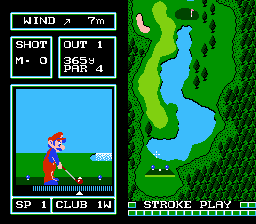
Golf - Japan Course (Japan) (DV 2)
Getting to Know Golf - Japan Course (Japan) (DV 2)
Golf - Japan Course (Japan) (DV 2) is a Famicom Disk System release from Nintendo, originally distributed in Japan during the late 1980s. This is an official title, not a hack or fan translation. It belongs to the sports genre and is part of the Disk Writer series, which allowed players to download different courses at kiosks. The 'DV 2' label likely indicates a specific disk revision. Nintendo developed and published it themselves, staying true to their early push for accessible sports simulations on the FDS.
How to Play Golf - Japan Course (Japan) (DV 2) Online
Getting Started
When you boot up the game, you will see a title screen in Japanese. Press Start to begin. You will then select a course; since this is the Japan Course disk, only that course is available. Use the D-Pad to navigate menus and A/Z to confirm choices. The game expects you to play 18 holes of golf, aiming to finish with the fewest strokes.
The core loop is simple: choose your club from the menu, then aim your shot using the D-Pad. A power gauge appears - press the A button once to start the gauge moving, then press it again to set power. A second gauge for accuracy may appear before the swing. Be mindful of wind direction, shown at the top of the screen. More advanced mechanics include spin and putting, which are standard for the era. Menus are entirely in Japanese, but the gameplay is intuitive once you understand the rhythm of the swing interface.
Golf - Japan Course (Japan) (DV 2) Keyboard Controls
Controls
- Arrow Keys: D-Pad / Movement
- X: A button (jump / confirm)
- S: B button (run / attack / cancel)
- Enter: Start / Pause
- V: Select





Comments (0)