The game loads when you press Play · press “Play Now” inside the game if it asks.
Exciting Billiard (Japan)
Exciting Billiard
About Exciting Billiard
- Famicom Disk System
- Sports
- 5· 0 votes
GAME INFO
- Platform
- Famicom Disk System
- Genre
- Sports
- Released
- 1987
- Players
- 1-2
- Region
- Japan
How to play Exciting Billiard online
Getting Started
When you boot the game, you will see a title screen and then a menu in Japanese. The options likely include starting a game, changing the number of players, and possibly selecting a table or difficulty. Since the text is only in Japanese, you may need to experiment or use an online translation. Press Start or Select to navigate, then confirm with the A button (X key).
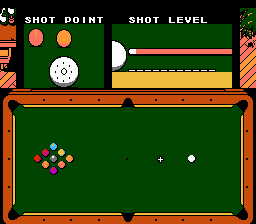
The objective is simple: pocket all of your assigned balls before your opponent does. You take turns with the computer or another player. Use the D-Pad to move the cue indicator around the table, then adjust the aim direction and power. The A button (X key) typically confirms your aim, and then you must pull back and release the cue by pressing A again or holding a button to set power. The exact shooting method may require trial and error; watch the on-screen meter or indicator if present.
Once you pocket a ball, you continue your turn. If you miss or commit a foul, the turn passes to the other player. The game ends when all balls are pocketed. There are no extra modes or power-ups, just straight pool rules adapted for the FDS. If you get stuck, remember that most FDS games had a simple one-screen table view and responsive controls, so practice lining up shots gradually.
CONTROLS
Controls
- Arrow Keys: D-Pad / Movement
- X: A button (jump / confirm)
- S: B button (run / attack / cancel)
- Enter: Start / Pause
- V: Select
Exciting Billiard FAQ
Who developed Exciting Billiard?
The developer of Exciting Billiard is not widely documented in standard English-language sources. It was likely an internal project at Nintendo or a contracted studio, but no specific team name is commonly attached.
Does Exciting Billiard have a multiplayer or co-op mode?
Exciting Billiard supports two players in an alternating turn-based mode. One player shoots, then the other takes their turn, which is standard for digital pool games of the era.
In what year was Exciting Billiard originally released?
Exciting Billiard was originally released in Japan in 1987. This release coincided with the active period of the Famicom Disk System as a platform for original sports titles.
You may also like
All Famicom Disk System games Aki to Tsukasa no Fushigi no Kabe
 Yume Koujou - Doki Doki Panic
 Bishoujo Hanafuda Club Vol.2 - Koikoi Bakappana Hen
 Bishoujo Shashinkan - Studio Cut
 Bishoujo Sexy Slot
 Bishoujo Hanafuda Club Vol.1 - Oichokabu Hen
 Transformers - The Headmasters
 Bakutoushi Patton-kun
 Aliens - Alien 2
 Tenshitachi no Houkago
 Backgammon
 Chitei Tairiku Ordola
GAME INFO
- Platform
- Famicom Disk System
- Genre
- Sports
- Released
- 1987
- Players
- 1-2
- Region
- Japan
COMMENTS (0)
No comments yet. Be the first to share your thoughts.