The game loads when you press Play · press “Play Now” inside the game if it asks.
World Derby (Japan)
World Derby
World Derby on GG
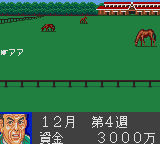
The player takes on the role of a jockey, guiding a horse through a series of races. You must manage speed and stamina using the D-Pad and buttons to steer, accelerate, and perhaps use a whip or strategy to gain an edge. Races are shown from a side-view perspective, typical of the era, with simple graphics and a small track that scrolls as you ride. The goal is to cross the finish line first by pacing correctly and timing bursts of speed.
For fans of retro sports games, World Derby offers a straightforward take on horse racing without the complexity of modern sims. Its place in the Game Gear library is niche, but it serves as a decent example of how the handheld handled the genre. If you enjoy 8-bit racing or want to see how Sega's portable system competed with the Game Boy in sports titles, this is worth a quick ride.
GAME INFO
How to play World Derby online
Getting Started
When you start World Derby, you'll see a Japanese title screen. Press Start (Enter) to proceed. The main menu is in Japanese, but the options are few: likely a race mode and maybe a settings screen. Highlight the first option and confirm with the A button (X on keyboard) to begin.
You control your horse from a side view. Use the D-Pad to steer left and right - but remember, the horse naturally moves forward. You need to stay in your lane and avoid bumping into other horses too much. The A button (X) may be used to sprint or use a stamina boost, while the B button (S) could be for braking or a whip action. Keep an eye on your stamina bar (if present) and don't exhaust your horse too early.
The core loop is simple: race against several AI opponents over a few laps. Finish in first to advance to the next race or earn points. Because the game is in Japanese, trial and error is your friend at the menus. There's no deep simulation, just pure arcade horse racing with timing and positioning as your main skills.
CONTROLS
Controls
- Arrow Keys: D-Pad / Movement
- X: Button 1
- S: Button 2
- Enter: Start / Pause
World Derby FAQ
Who developed World Derby?
Information about the developer of World Derby is not widely documented. It was likely developed by an internal Sega team or a smaller Japanese studio, but no specific developer name is commonly associated with this title.
Is World Derby exclusive to Game Gear or did it appear on other systems?
World Derby appears to be exclusive to the Sega Game Gear. No known ports or versions for other consoles have been documented, making it a unique entry in the handheld's library.
What makes World Derby stand out among Game Gear titles of its era?
Its focus on horse racing is relatively rare on the Game Gear, which had more platformers and arcade ports. The side-view perspective and stamina management give it a distinct feel compared to standard racing games on the system.








COMMENTS (0)
No comments yet. Be the first to share your thoughts.