World Beach Volley (Japan)
World Beach Volley (Japan) on TG16
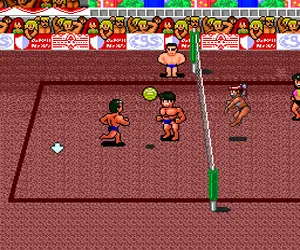
World Beach Volley is a beach volleyball game released for the NEC TurboGrafx-16 (known as the PC Engine in Japan). This is the Japanese version of what was called Sonic Spike World Championship Beach Volleyball in other regions. It came out during the early 1990s, when the TurboGrafx-16 was competing with the Super Nintendo and Sega Genesis. The game sticks to the basic premise of two-on-two beach volleyball, with a focus on fast rallies and simple controls built for quick pickup play.
How to Play World Beach Volley (Japan) Online
Getting started
When you first boot the game, you will see a menu in Japanese. The top option is usually to start a single match or exhibition mode. Use the D-Pad to move the cursor and press X to confirm. If you want to change settings before playing, the second option is typically the options screen where you can adjust difficulty or match length.
The core objective is straightforward: win a volleyball match by reaching a set number of points (usually 15) with a two-point lead. You control one of the two players on your team while the computer controls your partner. The action is viewed from a side perspective. Use the D-Pad to move your player, press X to jump, and press S to serve or spike the ball. Timing is key, especially for blocking and spiking returns.
Because the menus are entirely in Japanese, it helps to remember the layout: the first option starts a game, the second goes to options, and the third may be a multiplayer mode. If you want to play against another person, select the option that shows two player icons (usually the last option on the main menu). The controls remain the same for both players in two-player mode, but the second player uses a different button mapping not listed here (you may need to configure a second controller in your emulator settings).
World Beach Volley (Japan) Keyboard Controls
Controls
- Arrow Keys: D-Pad / Movement
- X: I button
- S: II button
- Enter: Run / Start
- V: Select






Comments (0)