The game loads when you press Play · press “Play Now” inside the game if it asks.
Winning Shot (Japan)
Winning Shot
What is Winning Shot?
- NEC TURBOGRAFX-16
- Sports
- 5· 0 votes
GAME INFO
- Platform
- NEC TURBOGRAFX-16
- Genre
- Sports
- Publisher
- Data East
- Region
- Japan
How to play Winning Shot online
Getting Started
When you start Winning Shot, you are taken to a title screen in Japanese. Press Start to move to the menu, where you can select a game mode. The options are limited - likely single-player stroke play or a two-player versus mode. Use the D-Pad to highlight your choice and press X to confirm. Since the menus are in Japanese, you may need to experiment to understand each option. Typically the first option is "Start Game" and the second may be "Options" or "Sound Test".
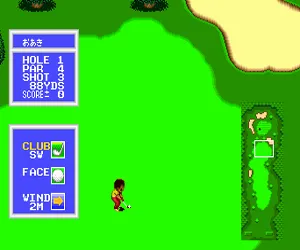
Once a round begins, you control a golfer on the tee. First, select a club from your bag using the D-Pad left/right - you have drivers, irons, wedges, and a putter. Then aim your shot by moving a cursor on the overhead map. Press X to bring up the swing meter. You press X again to start the power bar moving, then press X a third time to set power, and finally a fourth time to set accuracy (if the game uses a two-stage swing). Wind and terrain are displayed at the top of the screen; adjust your aim accordingly. The goal is to sink the ball in the hole in as few strokes as possible.
Pay attention to the lie of the ball - shots from the rough or sand have less distance and control. Putting uses a different, more delicate swing meter. If you are new to the game, start on an easier course (if selectable) and take time to learn the power meter timing. The game penalizes out-of-bounds shots with a stroke penalty, so conservative play is better early on.
CONTROLS
Controls
- Arrow Keys: D-Pad / Movement
- X: I button
- S: II button
- Enter: Run / Start
- V: Select
Winning Shot FAQ
Is Winning Shot an official release, a fan hack, a prototype, or another kind of build?
Winning Shot is an official commercial release from Data East for the PC Engine. It was later re-released on the Wii Virtual Console in Japan. It is not a hack, prototype, or fan build.
Is Winning Shot exclusive to NEC TURBOGRAFX-16 or did it appear on other systems?
Winning Shot originally appeared only on the PC Engine (TurboGrafx-16) in Japan. It later received a digital re-release on the Wii Shop Channel in Japan but did not appear on other consoles or regions.
What type of game is Winning Shot?
Winning Shot is a golf simulation. The player controls a golfer, selects clubs, adjusts aim, and uses a timing-based swing meter to hit the ball across a series of holes. Course elements like wind and terrain affect play.
You may also like
All NEC TURBOGRAFX-16 games











GAME INFO
- Platform
- NEC TURBOGRAFX-16
- Genre
- Sports
- Publisher
- Data East
- Region
- Japan
COMMENTS (0)
No comments yet. Be the first to share your thoughts.