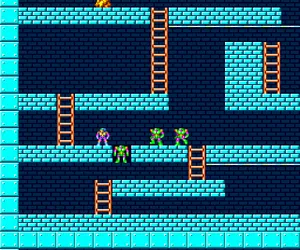
Lode Runner - Lost Labyrinth (Japan)
What is Lode Runner - Lost Labyrinth (Japan)?
Lode Runner - Lost Labyrinth is a Japanese-exclusive release of the classic puzzle-platformer for the NEC TurboGrafx-16 (known as the PC Engine in Japan). The game arrived during the system's early years, when the platform was seeing a steady influx of arcade ports and computer conversions. While the original Lode Runner was created by Doug Smith and published by Broderbund, this particular port was handled by a Japanese developer (likely Irem or a related studio), though exact credits are not widely documented. What is clear is that this version stands apart from other home console ports due to its built-in level editor, a direct nod to the game's origins on the Apple II.
The core gameplay remains true to the 1983 original: you control a stick-figure runner who must collect all the gold bars in a multi-tiered maze while avoiding patrolling guards. You can climb ladders, traverse ropes, and dig temporary holes to trap enemies, which vanish briefly and then reappear. The goal on each stage is to grab every piece of gold and then reach the exit ladder. The major addition here is the ability to design your own levels from scratch and save them, letting you create custom puzzles beyond the included 150+ stages. This make it a versatile sandbox for fans who enjoy level construction.
Today, Lode Runner - Lost Labyrinth is worth checking out for its classic, addictive gameplay and the rare inclusion of a full level editor on a console cartridge. It's a straightforward but rewarding puzzle game that doesn't overstay its welcome. If you enjoy games that test your timing and route planning, or if you have fond memories of the original computer version, this Turbografx-16 port is a solid pick. Just be aware that the menus are entirely in Japanese, so a little guesswork may be needed to navigate the editor options.
How to Play Lode Runner - Lost Labyrinth (Japan) Online
Lode Runner - Lost Labyrinth is a straightforward action-puzzle game. When you start, you will see a title screen with Japanese text. The main menu offers two primary options: a standard game (probably labeled "ゲーム") and a level editor (likely "エディット"). Press Start to begin the regular campaign, where you work through a series of increasingly complex stages. Your goal is to collect all the gold bars scattered across the maze and then reach the exit. Use the arrow keys to move, press X to jump (though jumping is rarely needed), and press S to dig a hole to your left or right. Digging trips enemies but also creates a pit that you can fall into, so use it carefully.
The core loop is simple: enter a level, find a path to grab every piece of gold while avoiding the roaming guards, then escape. You can climb ladders and traverse horizontal ropes. The guards move in patterns but will chase you if you get close. If a guard touches you, you lose a life. You have a limited number of lives per game, but continues are usually available. The level editor is the big draw here: from the main menu, select the editor to design your own stages. You can place gold, ladders, ropes, walls, and guards, then save your creation. Saved levels can be loaded and played later. Because the menus are in Japanese, you may need to experiment with button presses to understand each option. The D-pad moves a cursor, X confirms a placement, and S cancels. Take your time to learn the layout.
One important mechanic: when you dig a hole, you can fall into it or hop over it. Enemies that fall into a hole are temporarily immobilized, giving you time to run past. They will eventually climb out, so don't dawdle. If you get stuck, you can restart a level (usually with Select). There is no time limit, so plan your route. The game also keeps track of your high score, but the core satisfaction comes from solving the spatial puzzles. If you want to create your own challenges, the editor is surprisingly deep for a console title of this era.
Lode Runner - Lost Labyrinth (Japan) Keyboard Controls
Controls
- Arrow Keys: D-Pad / Movement
- X: I button
- S: II button
- Enter: Run / Start
- V: Select
Comments (0)