The game loads when you press Play · press “Play Now” inside the game if it asks.
Kyuukyoku Mahjong - Idol Graphics (Japan)
Kyuukyoku Mahjong - Idol Graphics
Kyuukyoku Mahjong - Idol Graphics - Puzzle Classic
- NEC TURBOGRAFX-16
- Puzzle
- 5· 0 votes
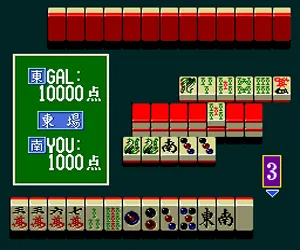
In Kyuukyoku Mahjong, the player engages in standard mahjong gameplay, drawing and discarding tiles to form winning hands. The core loop involves matching tiles or completing specific patterns against an AI opponent. While the exact ruleset isn't detailed in public archives, most TurboGrafx mahjong titles follow Japanese mahjong rules or offer a simplified solitaire mode. The 'Idol Graphics' likely refers to the character portraits that appear during play, adding a visual layer to the traditional tile game.
Today, Kyuukyoku Mahjong - Idol Graphics stands as a niche curiosity for retro collectors, especially those interested in Japanese-exclusive PC Engine software. It doesn't reinvent the mahjong formula, but its idol-themed presentation gives it a distinct flavour compared to more straightforward mahjong simulations. If you enjoy period-accurate tile games with a dash of anime aesthetic, this is worth a look. Without save states or a translation patch, modern players may find the Japanese menus challenging, but the core gameplay is intuitive enough to pick up.
GAME INFO
- Platform
- NEC TURBOGRAFX-16
- Genre
- Puzzle
- Players
- 1
- Region
- Japan
How to play Kyuukyoku Mahjong - Idol Graphics online
Getting Started
When you first start Kyuukyoku Mahjong - Idol Graphics, you will be greeted by a title screen and menu in Japanese. Use the D-pad to navigate the options, and press the A button (X on keyboard) to confirm a selection. The main menu typically offers choices like starting a new game, viewing high scores, or adjusting settings. Look for the kanji for 'start' or an obvious highlighted option. This is a single-player mahjong game, so you will be playing against AI opponents rather than real people.
The core gameplay revolves around drawing and discarding tiles to build a winning hand according to Japanese mahjong rules. You will see your hand displayed at the bottom of the screen, with the AI's tiles hidden. Use the D-pad to select which tile to discard, and press the B button (S key) to confirm your discard when you have drawn a new tile. If you complete a hand, you will declare a win - the game will likely prompt you with a clear visual cue. Pay attention to the meld buttons (if present) for calling chi, pon, or kan. Since the menus are in Japanese, you may need to experiment with the controls to understand the flow.
A helpful tip: modern emulator saves and states can help you retry hands if you are stuck. If you are unfamiliar with mahjong rules, look for an English guide online before jumping in. The game's pace is relaxed, so take your time learning the tile patterns and scoring. Even without understanding the text, the visual feedback of tile matching and winning hands makes it playable through trial and error.
CONTROLS
Controls
- Arrow Keys: D-Pad / Movement
- X: I button
- S: II button
- Enter: Run / Start
- V: Select
Kyuukyoku Mahjong - Idol Graphics FAQ
Who developed Kyuukyoku Mahjong - Idol Graphics?
The specific developer for this title is not widely documented in available sources. It appears to have been produced by a smaller Japanese studio during the TurboGrafx-16's commercial life. Without a clear credit, the development team remains unknown.
Is Kyuukyoku Mahjong - Idol Graphics exclusive to NEC TURBOGRAFX-16 or did it appear on other systems?
This game is exclusive to the NEC TurboGrafx-16 (PC Engine) in Japan. No ports or re-releases to other platforms have been recorded. Its regional exclusivity makes it a niche item for collectors.
Roughly how long does it take to finish Kyuukyoku Mahjong - Idol Graphics?
Playtime varies greatly depending on the mode and your familiarity with mahjong rules. A single game against an AI opponent might last 15 - 30 minutes, but completing all content could take several hours. There are no campaign length records available publicly.
You may also like
All NEC TURBOGRAFX-16 games











GAME INFO
- Platform
- NEC TURBOGRAFX-16
- Genre
- Puzzle
- Players
- 1
- Region
- Japan
COMMENTS (0)
No comments yet. Be the first to share your thoughts.