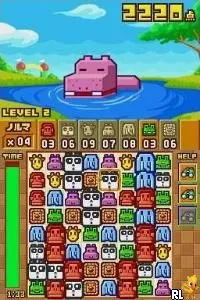
Zoo Keeper (Japan)
Zoo Keeper (Japan) Overview
Zoo Keeper (Japan) is a puzzle game developed for the Nintendo DS, originally released in Japan. This title fits within the casual gaming genre and features a charming animal theme that appeals to a wide audience. It was developed during a time when the DS was popular for its innovative touchscreen mechanics and family-friendly gaming experiences.
In Zoo Keeper, players take on the role of a zookeeper tasked with matching animals to clear them from the board. The gameplay revolves around connecting three or more of the same animals, which requires quick thinking and strategy. As players progress through the levels, they encounter different challenges and may need to manage limited moves, adding an element of strategy to the puzzle-solving mechanics.
This title is worth trying today for its simplicity and engaging gameplay that makes it easy to pick up and play. While it may not be as well-known as other DS titles, Zoo Keeper offers a nostalgic experience for fans of puzzle games. Its straightforward mechanics can be likened to other classics in the genre, making it a fun choice for both newcomers and seasoned players looking for a light-hearted gaming session.
How to Play Zoo Keeper (Japan) Online
Getting started with Zoo Keeper involves selecting a game mode from the main menu, which is presented in Japanese. Once you begin, your primary objective is to connect animals of the same type by sliding them around the grid-like board. The core loop of gameplay focuses on matching three or more animals to clear them, which can be done quickly to earn higher scores.
As you play, keep an eye on the number of moves available and aim to create larger combos for extra points. Familiarize yourself with the layout and practice making matches efficiently. While the menus may be in Japanese, navigating through the game should become intuitive as you get used to the controls and gameplay flow.
Zoo Keeper (Japan) Keyboard Controls
Controls
- Arrow Keys — D-Pad / Movement
- X — A button
- S — B button
- Z — Y button
- A — X button
- Q — L shoulder
- E — R shoulder
- Enter — Start
- V — Select






Comments (0)