Toon-Doku - Sudoku with Pictures! (Europe) (En,Fr,De,Es,It)
Getting to Know Toon-Doku - Sudoku with Pictures! (Europe) (En,Fr,De,Es,It)
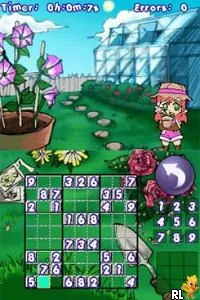
Toon-Doku - Sudoku with Pictures! is a puzzle game for the Nintendo DS that blends the classic Sudoku gameplay with a fun, visual twist. Released in Europe, this title offers a unique take on the traditional number-placement puzzle by incorporating images instead of digits. While the specific developer is not widely documented, the game fits neatly into the casual gaming genre that flourished on the DS platform, appealing to both seasoned Sudoku players and newcomers alike.
In Toon-Doku, players are tasked with filling a grid with pictures, adhering to the same rules as classic Sudoku. The objective is to ensure that each row, column, and designated box contains a unique set of images, without any repetitions. The game provides a variety of puzzles of differing difficulty levels, allowing players to gradually enhance their skills. This visual approach makes the game more engaging, particularly for those who might find traditional Sudoku too dry or challenging.
This title is worth exploring for fans of puzzle games, especially those who enjoy Sudoku and want a fresh perspective. While it may not have the depth or complexity of other titles in the genre, Toon-Doku's charming visuals and straightforward mechanics make it a delightful diversion. It occupies a niche within the DS library, providing a light-hearted alternative to more conventional puzzle offerings, and is especially enjoyable for casual gaming sessions.
How to Play Toon-Doku - Sudoku with Pictures! (Europe) (En,Fr,De,Es,It) Online
Getting started in Toon-Doku is simple; you begin by selecting a puzzle from the main menu. The game offers various difficulty levels, so you can choose one that matches your experience. Once you enter the puzzle, you will see a grid where you need to place the images according to the Sudoku rules.
The core loop revolves around filling the grid while ensuring that no images repeat in any row, column, or designated box. You can use the touchscreen to tap on the squares, selecting images as you go. If you make a mistake, the game typically allows you to backtrack or provides hints to help you out. Familiarizing yourself with the rules and practicing on easier puzzles will enhance your skills and make the gameplay more enjoyable.
Toon-Doku - Sudoku with Pictures! (Europe) (En,Fr,De,Es,It) Keyboard Controls
Controls
- Arrow Keys — D-Pad / Movement
- X — A button
- S — B button
- Z — Y button
- A — X button
- Q — L shoulder
- E — R shoulder
- Enter — Start
- V — Select

Comments (0)