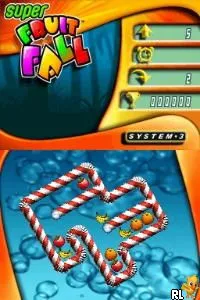
Super Fruit Fall (Europe) (En,Fr,De,Es,It)
Super Fruit Fall (Europe) (En,Fr,De,Es,It): NDS Puzzle
Super Fruit Fall is a puzzle game released for the Nintendo DS, primarily in Europe. The game was developed by a lesser-known studio and falls into the genre of casual puzzle gaming, which was quite popular during the DS era. This title supports multiple languages, including English, French, German, Spanish, and Italian, making it accessible to a wide audience across Europe.
In Super Fruit Fall, players engage in a colorful and engaging puzzle experience. The core gameplay involves matching fruits and clearing them from the screen, which aligns with the classic mechanics of many puzzle games of its time. Players often need to strategize to create combos and maximize their score, making use of the touch screen for an intuitive control scheme.
Though it may not be a blockbuster title, Super Fruit Fall has its charm and can be a delightful diversion for fans of puzzle games. Its simplicity makes it an easy pick-up-and-play experience, appealing to both casual gamers and those looking for a light challenge. Compared to other puzzle games of the era, it holds its own with a unique visual style and straightforward gameplay that can be refreshing amidst more complex titles.
How to Play Super Fruit Fall (Europe) (En,Fr,De,Es,It) Online
Getting started in Super Fruit Fall involves selecting a game mode from the main menu, which is presented in multiple languages. The gameplay revolves around matching fruits to clear levels, so familiarize yourself with the touch controls to swipe and tap effectively. As you progress, levels will increase in complexity, requiring more strategic thinking.
The core loop consists of clearing fruits and achieving high scores within a set number of moves or time limit. Pay attention to the fruit types and try to create combos for larger score boosts. It’s a good idea to plan your moves ahead of time, as some levels may introduce obstacles that require careful navigation.
Super Fruit Fall (Europe) (En,Fr,De,Es,It) Keyboard Controls
Controls
- Arrow Keys — D-Pad / Movement
- X — A button
- S — B button
- Z — Y button
- A — X button
- Q — L shoulder
- E — R shoulder
- Enter — Start
- V — Select






Comments (0)