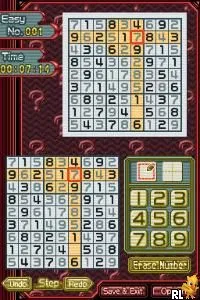
Sudoku Master (Europe) (En,Fr,De,Es,It,Nl)
Sudoku Master (Europe) (En,Fr,De,Es,It,Nl) on NDS
Sudoku Master (Europe) (En,Fr,De,Es,It,Nl) is a Nintendo DS title that brings the classic Sudoku puzzle experience to handheld gaming. Released in the mid-2000s, it caters to a European audience with support for multiple languages including English, French, German, Spanish, Italian, and Dutch. As a puzzle game, it fits neatly into the genre conventions of its time, focusing on logic and number placement rather than action or adventure elements.
In this game, players engage with Sudoku puzzles of varying difficulty levels. The objective is to fill a 9x9 grid with numbers so that each column, row, and 3x3 subgrid contains all digits from 1 to 9 without repetition. Players can select their preferred difficulty and work through puzzles at their own pace, making use of hints if needed. The touch screen functionality of the Nintendo DS allows for a more intuitive input method, letting players tap on cells to enter numbers.
Sudoku Master is worth a try for those who enjoy logic puzzles and are looking for a portable version of the classic game. While it may not offer the depth or variety of other puzzle games on the platform, its simplicity and focus on Sudoku make it a solid choice for fans of the genre. It holds a niche appeal, particularly for players who appreciate the challenge of Sudoku in a handheld format, and is a great way to pass the time whether at home or on the go.
How to Play Sudoku Master (Europe) (En,Fr,De,Es,It,Nl) Online
To get started with Sudoku Master, select a puzzle from the main menu. You can choose from various difficulty levels, which cater to both beginners and seasoned players alike. Once you’ve selected a puzzle, the grid will appear on the screen, ready for you to fill in the numbers.
The core loop of the game involves examining the grid and placing numbers in a logical manner. Each number from 1 to 9 must appear exactly once in each row, column, and 3x3 subgrid. Utilize the touch screen to select cells and input numbers directly. If you find yourself stuck, don’t hesitate to use hints to assist you, as they can help you progress through more challenging puzzles.
Sudoku Master (Europe) (En,Fr,De,Es,It,Nl) Keyboard Controls
Controls
- Arrow Keys — D-Pad / Movement
- X — A button
- S — B button
- Z — Y button
- A — X button
- Q — L shoulder
- E — R shoulder
- Enter — Start
- V — Select






Comments (0)