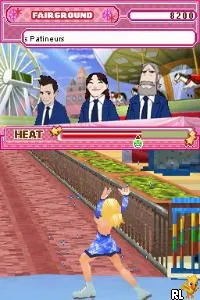
Princess on Ice (Europe) (En,Fr,De,Es,It)
Inside Princess on Ice (Europe) (En,Fr,De,Es,It)
Princess on Ice (Europe) (En,Fr,De,Es,It) is a game for the Nintendo DS that was released in Europe. It falls within the sports genre, specifically focusing on figure skating. While specific details about the developer or publisher are not widely documented, the game is notable for being localized in multiple languages, which makes it accessible to a broader audience in Europe.
In this title, players take on the role of a figure skater and engage in various skating challenges. The gameplay typically involves performing tricks and routines on the ice, with a focus on timing and precision. Players navigate through different levels, each presenting unique obstacles and opportunities to showcase their skating skills. The controls are designed to be intuitive, allowing players to jump, spin, and execute moves that earn points in competitions.
Today, Princess on Ice is worth trying for those who enjoy sports games or are nostalgic for the Nintendo DS era. While it may not be as widely recognized as other titles, it offers a unique experience for fans of figure skating. Compared to similar games from its time, it provides a lighthearted approach to the genre, making it an interesting addition to any retro gaming collection.
How to Play Princess on Ice (Europe) (En,Fr,De,Es,It) Online
To get started with Princess on Ice, select your skater and choose a mode to play. You can participate in various competitions where your objective is to perform well on the ice. The core loop revolves around mastering skating techniques, performing tricks, and earning points based on your execution.
As you progress, you'll encounter different levels that test your skills in timing and maneuverability. Pay attention to the prompts and practice your moves to improve your scores. Familiarizing yourself with the controls is essential for executing more complex tricks and routines as you advance through the game.
Princess on Ice (Europe) (En,Fr,De,Es,It) Keyboard Controls
Controls
- Arrow Keys — D-Pad / Movement
- X — A button
- S — B button
- Z — Y button
- A — X button
- Q — L shoulder
- E — R shoulder
- Enter — Start
- V — Select






Comments (0)