Picross DS (Japan)
Picross DS (Japan): NDS Puzzle
Picross DS is a puzzle game released exclusively for the Nintendo DS in Japan. Developed by Nintendo, it belongs to the popular Picross series, which combines logic puzzles with grid-based artwork. The game debuted in 2007 and showcases the unique capabilities of the DS, particularly its touchscreen interface, which enhances the puzzle-solving experience.
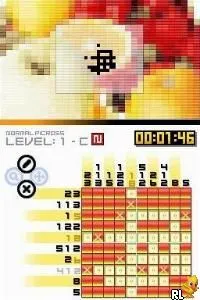
In Picross DS, players fill in a grid based on numerical clues provided for each row and column. These clues indicate how many contiguous squares should be filled in, requiring players to use deduction to reveal hidden images. The game includes various puzzle sizes and difficulties, allowing players to choose challenges that suit their skill level. The touchscreen controls make it easy to select and fill squares, providing a seamless gameplay experience.
This title is worth exploring for fans of puzzle games and those looking for a mentally stimulating experience. While it may not have the broad appeal of action or adventure titles, Picross DS offers a satisfying blend of strategy and logic that can be quite addictive. It stands out in the casual puzzle genre, especially for players who enjoy methodical thinking and pattern recognition, making it a must-try for puzzle enthusiasts.
How to Play Picross DS (Japan) Online
To get started with Picross DS, select a puzzle from the main menu, which is presented in Japanese. While navigating the menus, you can use the D-Pad to move through options and the A button to select. Each puzzle begins with a blank grid alongside the clues that indicate how to fill in the squares.
The core gameplay loop involves analyzing the clues and marking squares as filled or empty based on logical deductions. Take your time to think through the clues, as mistakes can lead to penalties. If you're new to the Picross genre, it might take a little while to get used to the logic, but the satisfaction of completing a puzzle is well worth the effort.
Picross DS (Japan) Keyboard Controls
Controls
- Arrow Keys — D-Pad / Movement
- X — A button
- S — B button
- Z — Y button
- A — X button
- Q — L shoulder
- E — R shoulder
- Enter — Start
- V — Select






Comments (0)