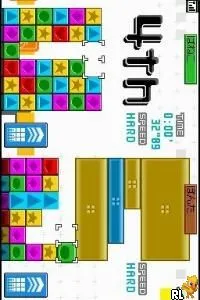
Panel de Pon DS (Japan)
Panel de Pon DS (Japan) Overview
Panel de Pon DS, known in Japan as a vibrant puzzle game, was released for the Nintendo DS. This title, part of the acclaimed Panel de Pon series, showcases the talent of Nintendo's development team. The game fits perfectly within the puzzle genre, which was quite popular during the DS era, known for its innovative touchscreen mechanics and engaging gameplay.
In this game, players match colored blocks to clear them from the screen. The core mechanic revolves around creating combos and chaining matches to score points. As players progress, the game introduces increasingly challenging stages, requiring quick thinking and strategic planning. The touchscreen functionality allows for intuitive control, making it easy to drag and drop blocks to create matches, which was a fresh approach for puzzle games at the time.
Today, Panel de Pon DS remains a charming title worth exploring for puzzle enthusiasts. While it may not have the same recognition as other Nintendo franchises, it offers a delightful experience that is reminiscent of classic puzzle gameplay. Compared to similar titles of its time, it stands out with its unique art style and engaging mechanics, making it a hidden gem in the Nintendo DS library.
How to Play Panel de Pon DS (Japan) Online
To get started in Panel de Pon DS, first navigate through the menus, which are in Japanese. Familiarize yourself with the basic mechanics of matching colors and clearing blocks. The game begins with simple levels that gradually increase in complexity, so take your time to understand the flow of gameplay.
Your main goal is to create matches of three or more blocks of the same color. As you clear blocks, watch for opportunities to create larger combos for bonus points. The game encourages strategic thinking, so plan your moves carefully to maximize your score and clear the screen efficiently.
Panel de Pon DS (Japan) Keyboard Controls
Controls
- Arrow Keys — D-Pad / Movement
- X — A button
- S — B button
- Z — Y button
- A — X button
- Q — L shoulder
- E — R shoulder
- Enter — Start
- V — Select






Comments (0)