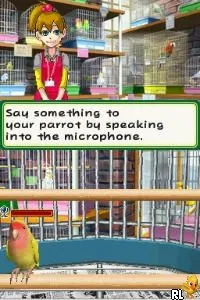
My Pet Parrot (Europe) (En,Fr,De,Es,It)
My Pet Parrot (Europe) (En,Fr,De,Es,It) Overview
My Pet Parrot (Europe) (En,Fr,De,Es,It) is a simulation game released on the Nintendo DS, focusing on the care and interaction with a virtual pet parrot. It was developed during the height of the Nintendo DS era, a time when pet simulation games were quite popular, allowing players to nurture and engage with digital pets. This title is notable for its multilingual support, catering to players across various European countries, including English, French, German, Spanish, and Italian.
In the game, players take on the responsibility of raising and caring for a parrot. This involves feeding, playing, and training the bird, all of which are essential for keeping it happy and healthy. The gameplay typically revolves around daily interactions, where players can perform various tasks that mimic real-life pet ownership, such as cleaning the cage and teaching the parrot tricks. The mechanics are straightforward, making it accessible for younger audiences or those new to simulation games.
Today, My Pet Parrot serves as a nostalgic reminder of the pet simulation genre that was prevalent on handheld consoles like the DS. While it may not have the depth of some larger titles, it offers a simple, enjoyable experience for those who appreciate lighter gameplay. It holds a particular charm for players looking to relive the era of virtual pet games and is worth trying if you enjoy casual simulation experiences.
How to Play My Pet Parrot (Europe) (En,Fr,De,Es,It) Online
To get started in My Pet Parrot, players should first select their language preference from the available options. Once in the game, you will be introduced to your parrot, and the initial tasks will involve basic care routines like feeding and cleaning. Engaging with your parrot through play and training is essential for its happiness and development.
The core gameplay loop revolves around daily interactions with your pet. Players must balance different activities to ensure their parrot remains content. As you progress, you can unlock new features or tricks to teach your parrot, deepening the simulation experience. Familiarizing yourself with the controls will help streamline these tasks, allowing for a more enjoyable experience.
My Pet Parrot (Europe) (En,Fr,De,Es,It) Keyboard Controls
Controls
- Arrow Keys — D-Pad / Movement
- X — A button
- S — B button
- Z — Y button
- A — X button
- Q — L shoulder
- E — R shoulder
- Enter — Start
- V — Select






Comments (0)