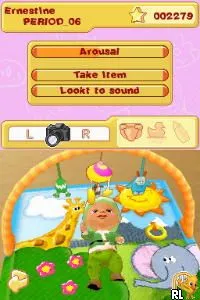
My Baby - Boy (Europe) (En,Fr,De,Es,It,Nl,Pt)
What is My Baby - Boy (Europe) (En,Fr,De,Es,It,Nl,Pt)?
My Baby - Boy (Europe) (En,Fr,De,Es,It,Nl,Pt) is a simulation game released for the Nintendo DS. This title, part of the 'My Baby' series, was developed to cater to young audiences interested in nurturing and caring for virtual babies. The game is designed to be engaging for children and offers multilingual support, making it accessible across various European regions.
In My Baby - Boy, players take on the role of a caregiver responsible for raising a virtual baby boy. The gameplay revolves around feeding, bathing, and playing with the baby, simulating the responsibilities of parenthood. Players interact with their baby through touch controls, providing an intuitive experience. As the baby grows, players can unlock new activities and items, enhancing the nurturing experience.
This title is worth trying today for those interested in simulation games, particularly those focusing on parenting. While it may not have the depth of more complex simulation titles, its charm lies in its simplicity and the joy it brings to younger players. It occupies a niche in the DS library, appealing to fans of casual gameplay and those looking for a lighthearted experience in a well-known genre.
How to Play My Baby - Boy (Europe) (En,Fr,De,Es,It,Nl,Pt) Online
Getting started with My Baby - Boy involves selecting your baby and customizing its appearance. As you begin, focus on the core activities like feeding and playing to build a bond with your baby. The game encourages interaction, so pay attention to your baby’s needs as they arise.
The core loop revolves around keeping your baby happy and healthy. Regularly check on their needs, which include hunger and playtime. Completing these tasks not only keeps your baby content but also allows you to unlock further content and activities as you progress.
My Baby - Boy (Europe) (En,Fr,De,Es,It,Nl,Pt) Keyboard Controls
Controls
- Arrow Keys — D-Pad / Movement
- X — A button
- S — B button
- Z — Y button
- A — X button
- Q — L shoulder
- E — R shoulder
- Enter — Start
- V — Select






Comments (0)