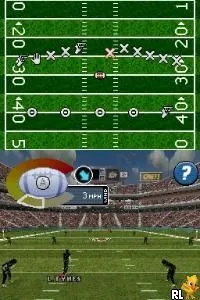
Madden NFL 08 (Europe)
Madden NFL 08 (Europe) - Sports Classic
Madden NFL 08 (Europe) is a sports simulation video game released for the Nintendo DS. This title, part of the long-running Madden NFL series, was developed by EA Sports and made its debut in the European market in 2007. Players can expect the same football action that the franchise is known for, albeit tailored for the handheld experience of the DS platform.
In the game, players take control of their favorite NFL teams and compete in various modes, including exhibition matches and season play. The controls are simplified for the DS, allowing players to navigate plays and execute strategies using the stylus and buttons. Gameplay involves managing plays, executing passes, and scoring touchdowns, all while trying to outmaneuver the opposing team on the field.
Madden NFL 08 on the DS holds a unique place in the franchise's history, especially for fans of handheld gaming. While it doesn't offer the depth of its console counterparts, it provides a solid experience for those looking to enjoy American football on the go. It's worth trying today for retro gaming enthusiasts and sports fans alike, especially as it captures the essence of the Madden series in a compact format.
How to Play Madden NFL 08 (Europe) Online
Getting started in Madden NFL 08 involves selecting your team and diving into either a quick match or a more extended season mode. Familiarize yourself with the controls as you navigate through plays and make strategic decisions on the field. The core loop revolves around executing plays, defending against the opponent, and ultimately scoring points to win the game.
As you progress, pay attention to the different play options available to you. Understanding your team's strengths and weaknesses will help you make better choices during gameplay. Don't hesitate to experiment with different strategies, as this can lead to a more enjoyable experience as you get accustomed to the game's mechanics.
Madden NFL 08 (Europe) Keyboard Controls
Controls
- Arrow Keys — D-Pad / Movement
- X — A button
- S — B button
- Z — Y button
- A — X button
- Q — L shoulder
- E — R shoulder
- Enter — Start
- V — Select
Comments (0)