Kreuzwortraetsel DS - Welt Edition (Germany)
Kreuzwortraetsel DS - Welt Edition (Germany) - Puzzle Classic
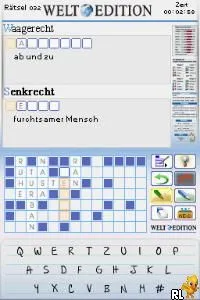
Kreuzwortraetsel DS - Welt Edition (Germany) is a puzzle game released for the Nintendo DS. This title is part of the Kreuzworträtsel series, which focuses on crossword puzzles. While specific development details are scarce, it is well-known within the niche of educational and puzzle games on the platform.
In this game, players engage in filling out crossword puzzles using clues provided in various categories. The gameplay involves navigating through grids and inputting answers, which is a common mechanic found in crossword games. The touch screen of the Nintendo DS allows for intuitive interaction, making it easy to select letters and solve puzzles as you progress.
What makes Kreuzwortraetsel DS - Welt Edition worth exploring today is its straightforward yet engaging approach to crossword puzzles. While it may not have the depth or complexity of more modern titles, it offers a nostalgic experience for fans of classic puzzle games. Compared to other DS titles, it serves as a solid option for casual play, especially for those who enjoy word games and challenges in a portable format.
How to Play Kreuzwortraetsel DS - Welt Edition (Germany) Online
To get started in Kreuzwortraetsel DS - Welt Edition, choose a puzzle from the available options. Each puzzle presents a grid with clues that correspond to the rows and columns. Begin by selecting a square and inputting letters based on the clues provided. This process involves a mix of deduction and vocabulary skills as you fill in the answers.
As you progress, the core loop revolves around solving each crossword puzzle efficiently. Pay attention to the clues and try to complete the easier answers first, which can help you with the more challenging ones. The game encourages a methodical approach, making it an enjoyable experience for both casual players and crossword enthusiasts alike.
Kreuzwortraetsel DS - Welt Edition (Germany) Keyboard Controls
Controls
- Arrow Keys — D-Pad / Movement
- X — A button
- S — B button
- Z — Y button
- A — X button
- Q — L shoulder
- E — R shoulder
- Enter — Start
- V — Select






Comments (0)