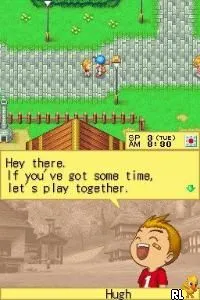
Harvest Moon DS (Europe) (En,Fr,De,Es,It)
What is Harvest Moon DS (Europe) (En,Fr,De,Es,It)?
Harvest Moon DS (Europe) (En,Fr,De,Es,It) is a farming simulation game released for the Nintendo DS. Developed by Marvelous Interactive, it came out in Europe after its initial launch in Japan. This title is part of the long-running Harvest Moon series, known for its charming blend of farming, relationship building, and life simulation elements.
In Harvest Moon DS, players take on the role of a farmer who inherits a run-down farm. The core gameplay loop revolves around planting crops, raising animals, and expanding the farm. Players can interact with townsfolk, build relationships, and even marry. The game incorporates a day-night cycle and seasonal changes, which affect gameplay and farming strategies, making time management key to success.
This title remains worth exploring today for those who enjoy simulation games with a slower pace. It holds a special place in the Harvest Moon franchise, offering a mix of familiar mechanics and new elements that fans appreciate. While it may not be as polished as some modern titles, its nostalgic charm and engaging gameplay make it a pleasant experience for both newcomers and series veterans.
How to Play Harvest Moon DS (Europe) (En,Fr,De,Es,It) Online
Getting started in Harvest Moon DS involves choosing your character and setting up your farm. Initially, players should focus on planting crops and taking care of animals. As you progress, you will unlock more features, such as fishing and mining, which can provide additional resources for your farm.
The core loop of the game revolves around managing your time effectively between farming, socializing, and completing various tasks. Building relationships with villagers can lead to events that enhance gameplay, such as festivals or marriage options. Understanding the seasons and how they impact crop growth is also crucial for long-term success.
Harvest Moon DS (Europe) (En,Fr,De,Es,It) Keyboard Controls
Controls
- Arrow Keys — D-Pad / Movement
- X — A button
- S — B button
- Z — Y button
- A — X button
- Q — L shoulder
- E — R shoulder
- Enter — Start
- V — Select
Comments (0)