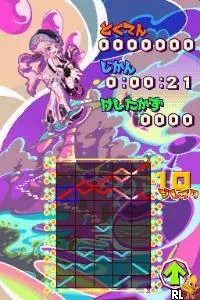
Gunpey DS - Music x Puzzle (Europe) (En,Fr,De,Es,It)
About Gunpey DS - Music x Puzzle (Europe) (En,Fr,De,Es,It)
Gunpey DS - Music x Puzzle is a puzzle game developed for the Nintendo DS, released in Europe. This title is part of the Gunpey series, inspired by the original Game Boy title created by the legendary game designer Gunpei Yokoi. The game combines elements of music and puzzle genres, making it a unique entry in the DS library.
In Gunpey DS, players manipulate lines and shapes that flow across the screen, aiming to connect them in a way that clears the board. The mechanics revolve around creating continuous lines while listening to a diverse soundtrack. The gameplay is simple to grasp but offers depth as players strategize to maximize their score and clear levels efficiently.
This title offers a blend of engaging music and challenging puzzles, making it a worthy experience for puzzle enthusiasts. While it may not have the mainstream recognition of other puzzle games on the platform, it holds a niche appeal for fans of the genre. Gunpey DS invites players to enjoy an artistic and musical twist on classic puzzle gameplay, making it a curious addition to any retro gaming collection.
How to Play Gunpey DS - Music x Puzzle (Europe) (En,Fr,De,Es,It) Online
To get started with Gunpey DS, select your desired game mode from the main menu. The game typically features both single-player and multiplayer options, allowing for a variety of gameplay experiences. Once you enter a game, your objective is to connect lines and shapes to create continuous paths, which will clear them from the board.
As you progress, pay attention to the rhythm of the music, as it can enhance your gameplay experience. The core loop involves clearing lines and managing new shapes that appear, requiring quick thinking and strategic planning. Familiarize yourself with the controls, and don’t hesitate to experiment with different approaches to master the game.
Gunpey DS - Music x Puzzle (Europe) (En,Fr,De,Es,It) Keyboard Controls
Controls
- Arrow Keys — D-Pad / Movement
- X — A button
- S — B button
- Z — Y button
- A — X button
- Q — L shoulder
- E — R shoulder
- Enter — Start
- V — Select






Comments (0)