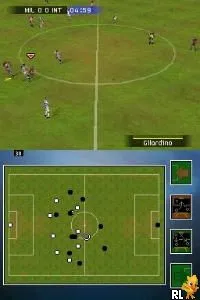
FIFA 08 (Korea)
FIFA 08 (Korea) - Sports Classic
FIFA 08 (Korea) is a sports simulation game released for the Nintendo DS. This version is a localized adaptation, specifically tailored for the Korean market, and was developed by EA Sports. As part of the long-running FIFA series, it aims to deliver a portable soccer experience that aligns with the franchise's reputation for realism and depth, albeit with the limitations typical of handheld gaming at the time.
In this title, players engage in soccer matches where they control teams from various leagues and compete in different game modes. The gameplay incorporates standard soccer mechanics, including passing, shooting, and tackling, using the DS controls effectively. While the game may not possess the full depth of its console counterparts, it offers an enjoyable experience for fans of the sport, allowing players to manage their teams and participate in competitive matches.
FIFA 08 (Korea) holds a niche spot in the library of DS titles, especially for those interested in sports games. While it may not be as well-known as other entries in the FIFA series, its accessibility on the DS makes it worth a try for retro gaming enthusiasts. The game's simplicity and focus on core soccer gameplay make it a decent option for casual play, particularly for fans of the genre looking for a handheld experience from that era.
How to Play FIFA 08 (Korea) Online
To get started with FIFA 08 (Korea), choose your preferred game mode from the main menu. As this title is in Japanese, it may be helpful to familiarize yourself with the navigation. Once you select a mode, you can start customizing your team or jump straight into a match.
The core loop involves playing through matches, managing your team’s strategies, and honing your skills on the field. Mastering the controls will be essential, as timing and precision are key to executing successful plays. The game offers a straightforward approach to soccer, making it accessible for both newcomers and seasoned players.
FIFA 08 (Korea) Keyboard Controls
Controls
- Arrow Keys — D-Pad / Movement
- X — A button
- S — B button
- Z — Y button
- A — X button
- Q — L shoulder
- E — R shoulder
- Enter — Start
- V — Select






Comments (0)