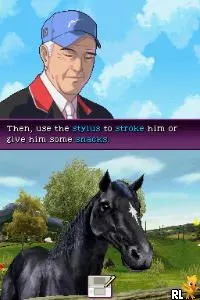
Ellen Whitaker's Horse Life (Europe) (En,Fr,De,Es,It,Nl)
About Ellen Whitaker's Horse Life (Europe) (En,Fr,De,Es,It,Nl)
Ellen Whitaker's Horse Life is a simulation game released for the Nintendo DS, offering players a glimpse into the world of horseback riding. Developed by the team behind the popular horse-themed titles, it debuted in Europe and features multi-language support, including English, French, German, Spanish, Italian, and Dutch. This game captures the essence of the equestrian lifestyle, making it a unique entry in the DS library during its time.
In this title, players take on the role of a young rider who must care for their horse, participate in various competitions, and improve their riding skills. The gameplay revolves around managing your horse’s health and training, while also engaging in events like show jumping and dressage. Players can customize their character and horse, creating a personalized experience that encourages interaction and strategy in managing resources.
Ellen Whitaker's Horse Life is worth exploring for fans of simulation games, especially those interested in equestrian activities. While it may not be as complex as some other titles in the genre, it offers a charming experience that resonates with horse lovers. Compared to other DS games, it stands out for its niche focus, appealing to a specific audience rather than the broader gaming market, making it a delightful, albeit simple, addition to any retro collection.
How to Play Ellen Whitaker's Horse Life (Europe) (En,Fr,De,Es,It,Nl) Online
To get started with Ellen Whitaker's Horse Life, choose your character and horse right at the beginning. The game will guide you through basic tutorials, so pay attention to learn how to care for your horse and navigate the various menus. The core loop involves managing your horse's health and training while participating in events.
Ellen Whitaker's Horse Life (Europe) (En,Fr,De,Es,It,Nl) Keyboard Controls
Controls
- Arrow Keys — D-Pad / Movement
- X — A button
- S — B button
- Z — Y button
- A — X button
- Q — L shoulder
- E — R shoulder
- Enter — Start
- V — Select






Comments (0)