Deep Labyrinth (Japan)
Inside Deep Labyrinth (Japan)
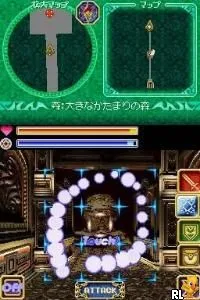
Deep Labyrinth is an action-adventure game released exclusively in Japan for the Nintendo DS. Developed by the now-defunct studio, it offers a unique blend of exploration and puzzle-solving within a first-person perspective. This title taps into the classic dungeon crawler genre, a staple of early gaming, but with the added twist of utilizing the DS's dual screens for gameplay mechanics and navigation.
In Deep Labyrinth, players navigate through a series of mazes filled with monsters, treasures, and various puzzles. The game emphasizes exploration, requiring players to solve environmental puzzles while engaging in combat against enemies. The controls are designed to make use of the DS's touchscreen and buttons, allowing for a mix of action and strategic planning as players delve deeper into the labyrinthine levels.
What sets Deep Labyrinth apart is its nostalgic nod to classic dungeon crawlers while leveraging the Nintendo DS's capabilities. Though it may not be the most well-known title, it offers a unique experience for fans of the genre. The game's first-person perspective and puzzle mechanics make it a worthy addition to any retro gaming library, especially for those who appreciate the intricacies of early 2000s handheld gaming.
How to Play Deep Labyrinth (Japan) Online
To get started with Deep Labyrinth, first familiarize yourself with the controls as listed above. Once you begin, you'll find yourself in a maze-like environment where exploration is key. Pay attention to your surroundings, as clues and items can be critical for solving puzzles and defeating enemies.
As you progress, the core gameplay loop involves navigating through levels, engaging in battles, and solving puzzles to unlock new areas. Since this game is in Japanese, players may need to rely on visual cues and trial-and-error to navigate menus and understand objectives. Keep an eye out for hidden paths and secrets that can enhance your experience.
Deep Labyrinth (Japan) Keyboard Controls
Controls
- Arrow Keys — D-Pad / Movement
- X — A button
- S — B button
- Z — Y button
- A — X button
- Q — L shoulder
- E — R shoulder
- Enter — Start
- V — Select

Comments (0)