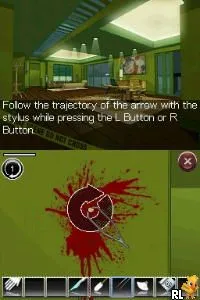
Crime Scene (Europe) (En,Fr,De,Es,It)
What is Crime Scene (Europe) (En,Fr,De,Es,It)?
Crime Scene (Europe) (En,Fr,De,Es,It) is a unique title for the Nintendo DS that blends elements of the adventure genre with mystery-solving gameplay. Released in Europe, it offers players a chance to engage in crime investigation scenarios. While the specific developer and publisher details are not widely documented, the game falls into the category of interactive storytelling, which was quite popular during the DS era.
In Crime Scene, players take on the role of an investigator tasked with solving various crimes. The gameplay typically involves collecting evidence, interrogating suspects, and piecing together clues to uncover the truth behind each case. The structure is designed to encourage critical thinking and deduction, as players must navigate through a series of challenges that require careful observation and logical reasoning.
This title is worth exploring today for those who appreciate narrative-driven experiences and puzzle-solving gameplay. While it may not be as widely recognized as some other DS titles, it offers a compelling look at the crime genre within video games. Fans of mystery and detective stories will find it a refreshing addition to their collection, especially as a nostalgic nod to the unique offerings of the Nintendo DS platform.
How to Play Crime Scene (Europe) (En,Fr,De,Es,It) Online
To get started with Crime Scene, begin by selecting a case to investigate. Each case will introduce you to a crime scene filled with clues and suspects. The core loop revolves around gathering evidence, talking to characters, and solving puzzles to move forward in the investigation.
As you play, pay attention to the details in the environment and the dialogue from suspects. This will help you piece together the story and make informed decisions on how to proceed. The game encourages exploration and deduction, so take your time to examine everything thoroughly to uncover the mystery behind each case.
Crime Scene (Europe) (En,Fr,De,Es,It) Keyboard Controls
Controls
- Arrow Keys — D-Pad / Movement
- X — A button
- S — B button
- Z — Y button
- A — X button
- Q — L shoulder
- E — R shoulder
- Enter — Start
- V — Select


Comments (0)