Colour Cross (Europe) (En,Fr,De,Es,It)
About Colour Cross (Europe) (En,Fr,De,Es,It)
Colour Cross (Europe) (En,Fr,De,Es,It) is a puzzle game released for the Nintendo DS. This title is a part of the puzzle genre and is known for its engaging gameplay. While specific details about its developer remain unclear, the game has gained attention for its accessibility across multiple languages, making it appealing to a broader audience in Europe.
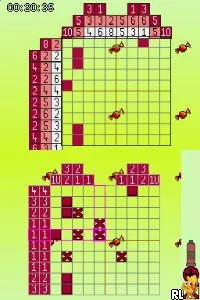
In Colour Cross, players are tasked with solving grid-based puzzles that involve filling in cells according to color codes. The mechanics revolve around logic and deduction, as players must determine which colors correspond to specific numbers. Each level presents a unique challenge, requiring players to think critically and plan their moves carefully to complete the grid without mistakes.
Today, Colour Cross stands out as a testament to the puzzle genre's charm, especially on the Nintendo DS. While it may not be as widely recognized as some of its contemporaries, it offers a satisfying experience for fans of logical puzzles. Its simplicity and focus on problem-solving make it a great choice for players looking for a casual gaming session or a way to unwind with a thoughtful challenge.
How to Play Colour Cross (Europe) (En,Fr,De,Es,It) Online
Getting started with Colour Cross involves selecting a puzzle from the menu. Once a level is chosen, players will see a grid where they need to fill in colors based on the clues provided. The core loop consists of analyzing the hints, making logical deductions, and filling in the grid correctly to complete the puzzle.
As players progress, the puzzles become increasingly complex, requiring more strategic thinking. It's essential to pay attention to the numbers and colors, as they guide your moves. New players should take their time to understand the mechanics, as mastering the logic behind the puzzles is key to enjoying the game fully.
Colour Cross (Europe) (En,Fr,De,Es,It) Keyboard Controls
Controls
- Arrow Keys — D-Pad / Movement
- X — A button
- S — B button
- Z — Y button
- A — X button
- Q — L shoulder
- E — R shoulder
- Enter — Start
- V — Select






Comments (0)