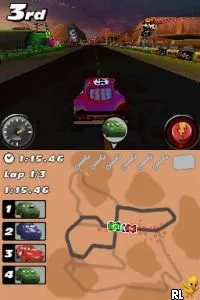
Cars - Race-O-Rama (Europe) (En,Es,It)
Cars - Race-O-Rama (Europe) (En,Es,It): NDS Racing
Cars - Race-O-Rama is a racing game released for the Nintendo DS, part of the popular Cars franchise based on the animated movie series. Developed by Avalanche Software and published by Disney Interactive Studios, it features a blend of racing and mini-games. This title was released in Europe and supports multiple languages including English, Spanish, and Italian, making it accessible to a wider audience.
In this game, players take control of various characters from the Cars universe, racing on different tracks inspired by the films. The gameplay includes traditional racing mechanics along with various challenges and mini-games that enhance the experience. Players can compete in races, complete challenges, and unlock new vehicles and upgrades as they progress through the game.
Despite being a game aimed at a younger audience, Cars - Race-O-Rama holds nostalgic value for fans of the franchise. It offers a lighthearted racing experience that stands alongside other racing titles of its era, though it may not have the depth of more serious racing simulations. For those looking to relive some childhood memories or introduce younger players to racing games, this title is worth a try.
How to Play Cars - Race-O-Rama (Europe) (En,Es,It) Online
To get started in Cars - Race-O-Rama, select your character and track. The game features a variety of racing events, and players can choose from different modes, including time trials and standard races. As you race, you will encounter power-ups and shortcuts, which can give you an advantage over your opponents.
The core loop revolves around racing, completing challenges, and earning points to unlock new cars and upgrades. Pay attention to the unique abilities of each character, as they can help you navigate tracks more effectively. Familiarize yourself with the controls and practice your racing skills to improve your performance in events.
Cars - Race-O-Rama (Europe) (En,Es,It) Keyboard Controls
Controls
- Arrow Keys — D-Pad / Movement
- X — A button
- S — B button
- Z — Y button
- A — X button
- Q — L shoulder
- E — R shoulder
- Enter — Start
- V — Select

Comments (0)