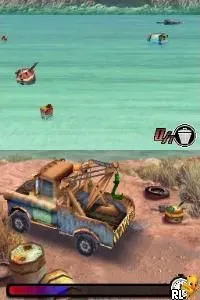
Cars (Europe)
About Cars (Europe)
Cars (Europe) is a racing video game for the Nintendo DS, based on the popular animated film franchise. Released in Europe, it was developed as an official tie-in to the movie, following the conventions of racing games in the DS era. The game captures the essence of the Cars universe while allowing players to experience racing in a portable format.
In Cars, players take control of various characters from the film, racing through different tracks inspired by the movie's settings. The gameplay typically involves navigating courses and competing against AI-controlled opponents, emphasizing speed and maneuverability. Players can expect a mix of straightforward racing mechanics and some light exploration elements, common in many racing titles of the time.
This title is worth trying for fans of the Cars franchise or those interested in retro racing games. While it may not offer the depth of more sophisticated racing simulations, it provides a nostalgic experience and a chance to revisit beloved characters. Compared to other racing games on the DS, it holds a place as a light-hearted, accessible option for both younger players and fans of the films.
How to Play Cars (Europe) Online
Getting started in Cars involves selecting a character and a race track from the main menu. The core loop revolves around racing against opponents, where players must navigate through various courses while avoiding obstacles. As players progress, they can unlock new tracks and characters, adding to the game's replayability.
It's essential to familiarize yourself with the controls early on, as mastering the handling of your character will significantly affect your performance. Pay attention to the layout of each track, as knowing the shortcuts and turns can give you an edge over opponents. While the game is straightforward, practicing will help you improve your skills and enjoy the racing experience.
Cars (Europe) Keyboard Controls
Controls
- Arrow Keys — D-Pad / Movement
- X — A button
- S — B button
- Z — Y button
- A — X button
- Q — L shoulder
- E — R shoulder
- Enter — Start
- V — Select

Comments (0)