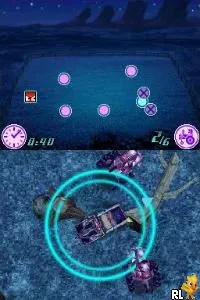
Cars (Europe) (Fr,Nl)
Getting to Know Cars (Europe) (Fr,Nl)
Cars (Europe) (Fr,Nl) is a racing game developed for the Nintendo DS, inspired by the popular animated movie of the same name. Released in Europe, this title caters to fans of the film and racing genre alike. While the specific development team is not widely documented, it falls under the category of licensed games that were common during the DS era, aiming to capitalize on the movie's success.
In the game, players take control of various characters from the Cars universe, racing through tracks inspired by the film's settings. The gameplay involves completing races against AI opponents, utilizing power-ups and boosts to gain an edge. Players can choose different vehicles and navigate through courses that may include shortcuts and obstacles, which adds a layer of strategy to the racing experience.
What makes Cars worth trying today is its nostalgic appeal and straightforward gameplay, which is reminiscent of other licensed titles from the mid-2000s. While it may not have the depth or polish of some top-tier racing games, it offers a fun experience for younger players or fans of the movie. The game serves as a light-hearted introduction to the racing genre, making it a suitable choice for casual gaming sessions.
How to Play Cars (Europe) (Fr,Nl) Online
Getting started with Cars involves selecting a character and vehicle, then choosing a race track to compete on. The core loop consists of navigating through the race, using speed boosts and avoiding obstacles to cross the finish line ahead of your opponents. Familiarizing yourself with the controls will enhance your performance, especially the timing of power-ups.
As you progress, you will unlock new tracks and vehicles, adding variety to your gameplay. Pay attention to the unique traits of each character, as they may influence your racing style. Overall, the game encourages players to experiment with different strategies to improve their race times and enjoy the whimsical world of Cars.
Cars (Europe) (Fr,Nl) Keyboard Controls
Controls
- Arrow Keys — D-Pad / Movement
- X — A button
- S — B button
- Z — Y button
- A — X button
- Q — L shoulder
- E — R shoulder
- Enter — Start
- V — Select

Comments (0)