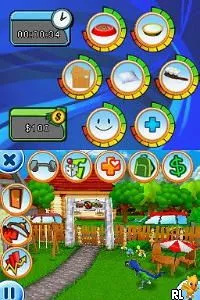
101 Dino Pets (Europe) (En,Fr,De,It)
What is 101 Dino Pets (Europe) (En,Fr,De,It)?
101 Dino Pets (Europe) (En,Fr,De,It) is a simulation game for the Nintendo DS that was released in Europe. It falls into the pet simulation genre, where players can take care of their dinosaur pets. The game was developed for the Nintendo DS platform, which was popular for its dual-screen functionality and touch controls, providing a unique experience compared to earlier handhelds.
In 101 Dino Pets, players engage in various activities centered around nurturing and caring for their virtual dinosaur companions. This includes feeding, playing, and training the dinosaurs, which helps them grow and develop. The gameplay mechanics typically involve interacting with the touch screen to perform actions, managing the needs of the pets, and possibly completing mini-games that contribute to their happiness and health.
This title is worth exploring for fans of the simulation genre, especially those who enjoy pet care games. While it may not have the depth of some larger titles, it captures the charm of the era's casual gaming scene. If you're looking for a light-hearted experience that evokes nostalgia for simpler gaming moments, 101 Dino Pets fits the bill, making it a fun addition to any retro collection.
How to Play 101 Dino Pets (Europe) (En,Fr,De,It) Online
Getting started in 101 Dino Pets involves choosing your first dinosaur and customizing its appearance. Players will then navigate through various activities that allow them to care for their pet, such as feeding, playing, and training. The core loop revolves around fulfilling the needs of the dinosaur while exploring the game's environments.
As you progress, you'll unlock new activities and possibly more dinosaur types. Keeping your dinosaur happy and healthy is essential, so pay attention to its needs and engage in the mini-games available. Familiarize yourself with the controls and mechanics early on to get the most out of your experience.
101 Dino Pets (Europe) (En,Fr,De,It) Keyboard Controls
Controls
- Arrow Keys — D-Pad / Movement
- X — A button
- S — B button
- Z — Y button
- A — X button
- Q — L shoulder
- E — R shoulder
- Enter — Start
- V — Select






Comments (0)