The game loads when you press Play · press “Play Now” inside the game if it asks.
Fleet Commander 2
Fleet Commander 2
Fleet Commander 2: MSX2 Strategy
GAME INFO
More Fleet Commander Games
Ready for another round? Explore more Fleet Commander games and console editions. Choose a game below to play it on its own page.
How to play Fleet Commander 2 online
Getting Started
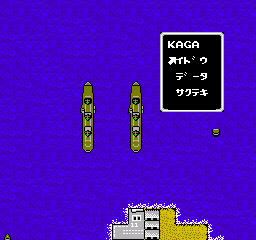
When you start Fleet Commander 2, you will likely see a title screen with options in Japanese. Use the Arrow Keys to navigate and X to confirm (or S to cancel). The game probably has a campaign or scenario mode where you select a mission. Since this is a Japanese-only title, you may need to rely on trial and error or external guides to understand menu options. Look for familiar kanji like "スタート" (start) or "選択" (select).
The core loop involves deploying units on a grid map, moving them turn by turn, and engaging enemy fleets when they come within range. Pay attention to supply and fuel, as running out can leave your ships stranded. Combat is often resolved automatically based on unit stats and positioning. The goal is typically to destroy all enemy units or capture a specific objective.
New players should start with the easiest mission to learn the interface. Experiment with moving one or two ships to see how the turn order works. If the game uses a hex grid, remember that moving diagonally costs more movement points. Save often if the emulator supports save states, because losing a fleet can mean restarting a long scenario.
CONTROLS
Controls
- Arrow Keys: D-Pad / Movement
- X: Trigger 1
- S: Trigger 2
- Enter: Start
Fleet Commander 2 FAQ
Is there anything iconic or memorable about Fleet Commander 2?
Information about Fleet Commander 2 is not widely documented in English sources, so details about iconic moments or memorable features are scarce. It is known as a sequel that expanded on the original game's mechanics, but no specific standout elements have been commonly recorded.
Does Fleet Commander 2 have a multiplayer or co-op mode?
Fleet Commander 2 is almost certainly a single-player experience, as most MSX2 strategy games of its era lacked multiplayer options. No evidence suggests it supports any form of co-op or versus play.
Is Fleet Commander 2 exclusive to MSX 2 or did it appear on other systems?
Based on available archives, Fleet Commander 2 appears to have been released exclusively for the MSX2 platform. It has not been documented on other systems such as the NES, PC-88, or Sharp X68000.












COMMENTS (0)
No comments yet. Be the first to share your thoughts.