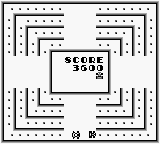
Head On (Japan)
About Head On (Japan)
Head On (Japan) is a notable arcade-style game released for the Game Boy. Originally developed by an unknown team, this title captures the essence of classic racing games from the late 80s and early 90s. Although it is a Japanese-only release, it perfectly embodies the simplicity and charm of early handheld gaming, making it an interesting find for retro enthusiasts.
In Head On, players navigate their car around a maze-like track, trying to collect items while avoiding collisions with walls and other obstacles. The gameplay is straightforward, focusing on maneuvering your vehicle to pick up points and achieve high scores. The controls are simple, making it easy for new players to get the hang of it quickly, while still offering a challenge as the levels progress.
For those seeking a nostalgic experience, Head On provides a slice of gaming history that is often overlooked. While it may not have the depth or complexity of larger titles, its straightforward mechanics and competitive nature offer a fun distraction. Fans of retro games will appreciate its simplicity, and it serves as a nice addition to any Game Boy collection, especially for those who enjoy arcade-style gameplay.
How to Play Head On (Japan) Online
Getting started in Head On involves selecting your game mode from the main menu, which is in Japanese. Don’t worry too much about the language barrier; navigation is intuitive, and you can quickly figure out the options. Once you start, your goal is to drive around the track, collecting items while avoiding walls and other hazards.
The core loop revolves around maneuvering your car skillfully to maximize your score. As you progress, the tracks may become more challenging, requiring sharper turns and quicker reflexes. Keeping an eye on your surroundings and learning the layout of each track can help you improve your performance.
Head On (Japan) Keyboard Controls
Controls
- Arrow Keys — D-Pad / Movement
- X — A button (jump / confirm)
- S — B button (run / attack / cancel)
- Enter — Start / Pause
- V — Select


Comments (0)