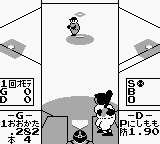
Famista (Japan)
Famista (Japan) on GB
Famista is a baseball simulation game that was released exclusively in Japan for the Game Boy. Developed by Namco, it captures the essence of the sport with a unique blend of arcade-style gameplay. As part of a long-running series, Famista has become a staple for fans of sports games on handheld consoles, showcasing the capabilities of the Game Boy during its prime in the early 1990s.
In Famista, players engage in baseball matches where they can choose teams, manage players, and compete in various game modes. The gameplay mechanics focus on pitching, batting, and fielding, all of which are simplified for quick play sessions typical of handheld gaming. Players navigate a series of menus to set up matches and select their desired options, making it accessible even for those not deeply familiar with baseball.
What makes Famista worth trying today is its nostalgic value and the way it encapsulates the sports gaming experience of its time. While it may not have the depth of modern sports titles, it offers a straightforward approach that appeals to both casual gamers and retro enthusiasts. Its charm lies in its simplicity, making it a fun diversion for anyone interested in classic gaming or the history of sports video games in Japan.
How to Play Famista (Japan) Online
To get started in Famista, players will first need to select their preferred game mode from the main menu. The menus are in Japanese, but players can navigate through options using the D-Pad and confirm selections with the A button. Once a mode is selected, players can choose their teams and set various match parameters.
During gameplay, the core loop involves pitching, batting, and fielding. Players will take turns at bat and in the field, trying to score runs while preventing the opposing team from doing the same. Familiarity with baseball rules can enhance the experience, but the game is designed to be accessible for newcomers as well.
Famista (Japan) Keyboard Controls
Controls
- Arrow Keys — D-Pad / Movement
- X — A button (jump / confirm)
- S — B button (run / attack / cancel)
- Enter — Start / Pause
- V — Select






Comments (0)