Bouken! Puzzle Road (Japan)
Bouken! Puzzle Road (Japan) - Puzzle Classic
Bouken! Puzzle Road is a puzzle game released for the Game Boy, primarily in Japan. It was developed in the early 1990s, a time when handheld gaming was gaining traction, and the genre was becoming more popular. This title is notable for its unique approach to puzzle mechanics, which set it apart from many other games on the platform.
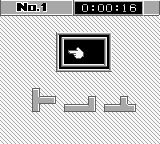
In Bouken! Puzzle Road, players navigate a grid-based environment where they must solve puzzles to progress through levels. The gameplay revolves around moving pieces and interacting with the environment, requiring logical thinking and strategy to advance. While the game does not feature a complex narrative, the engaging mechanics keep players invested as they try to complete each stage.
For those looking to explore lesser-known titles from the Game Boy library, Bouken! Puzzle Road offers a quaint experience that highlights the puzzle genre of its time. It may not have the fame of other blockbuster titles, but it holds a certain charm that can appeal to retro gaming enthusiasts. The simplicity of its gameplay and the nostalgia of classic puzzle-solving make it worth a try, especially for fans of the genre who are seeking something different from mainstream offerings.
How to Play Bouken! Puzzle Road (Japan) Online
To get started in Bouken! Puzzle Road, begin by selecting your game mode from the main menu. Since the menus are in Japanese, look for the option that resembles “Start” to begin your adventure. Once in the game, familiarize yourself with the controls, as they will be essential for solving the puzzles.
The core loop of the game involves solving grid-based puzzles by moving pieces around to achieve specific objectives. As you progress, you will encounter various challenges that require strategic thinking. Pay attention to the layout of each level, as understanding the mechanics is crucial for success. Don't hesitate to experiment with different moves to discover the best solutions.
Bouken! Puzzle Road (Japan) Keyboard Controls
Controls
- Arrow Keys — D-Pad / Movement
- X — A button (jump / confirm)
- S — B button (run / attack / cancel)
- Enter — Start / Pause
- V — Select






Comments (0)