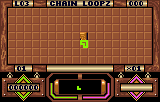
The game loads when you press Play · press “Play Now” inside the game if it asks.
Loopz (USA) (Proto)
Loopz
Loopz - Puzzle Classic
- ATARI Lynx
- Puzzle
- Prototype
- 5· 0 votes
GAME INFO
- Platform
- ATARI Lynx
- Genre
- Puzzle
- Released
- 1990
- Players
- 1
- Region
- USA
- Version
- Proto
How to play Loopz online
Getting Started
When you start Loopz, you'll see a grid and a piece appearing at the top. Use the D-Pad (Arrow Keys) to move the piece left or right, and press the A button (X key) to rotate it. Your goal is to place pieces so that they form a complete loop - any closed shape made of connected blocks. Once a loop is closed, those blocks will disappear and you'll earn points.
The game progresses in levels; each level increases the speed at which pieces fall and may introduce new piece shapes. The key strategy is to plan ahead and leave gaps where you can fit future pieces to create larger loops. If the pile reaches the top of the screen, the game ends. There's no story or timer - it's pure puzzle action focused on loop completion.
Since this is a prototype, the interface is minimal and in English. There are no complicated menus - just press Start to begin. Experiment with moving and rotating pieces to get a feel for the physics; the Lynx version handles similarly to the original computer versions but with a smaller screen.
CONTROLS
Controls
- Arrow Keys: D-Pad / Movement
- X: A button
- S: B button
- Q: Option 1
- E: Option 2
- Enter: Pause
Loopz FAQ
Is there anything iconic or memorable about Loopz?
Loopz is remembered as a clever puzzle game that predates many modern block-dropping titles. Its loop-formation mechanic, where you must complete closed shapes to clear blocks, was unique for its time and remains satisfying to pull off. The Atari ST original gained a small cult following, and the Lynx prototype is a rare piece of gaming history.
Is Loopz exclusive to ATARI Lynx or did it appear on other systems?
Loopz originally appeared on the Atari ST and was later ported to several platforms including the Amiga, Commodore 64, DOS, and consoles like the NES and Game Boy. The Lynx version exists only as a prototype and was never officially released, so it's not exclusive in the traditional sense but is unique to the Lynx as an unfinished build.
Which regions was Loopz released in?
The commercial releases of Loopz came out in North America and Europe across various platforms. The Lynx prototype is specifically a North American (USA) build, likely prepared for a potential US launch that never materialized. The original computer versions saw wider distribution in Europe as well.
You may also like
All ATARI Lynx games


GAME INFO
- Platform
- ATARI Lynx
- Genre
- Puzzle
- Released
- 1990
- Players
- 1
- Region
- USA
- Version
- Proto
COMMENTS (0)
No comments yet. Be the first to share your thoughts.