The game loads when you press Play · press “Play Now” inside the game if it asks.
Hard Drivin' (USA, Europe)
Hard Drivin'
Hard Drivin' - Racing Classic
- ATARI Lynx
- Racing
- 5· 0 votes
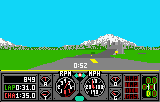
Hard Drivin' hit the ATARI Lynx as a portable version of an arcade sim racing classic originally released by Atari Games in 1989. This port brought the thrill of a polygonal 3D driving experience to a handheld, back when that sort of thing felt like science fiction. It's a straight-up racing game, no drifting or power-ups, just you, a sports car, and a course built for speed and stunts.
The idea is simple: take a test drive on a track that loops back on itself, hitting jumps and sharp turns while trying to set a fast lap time. You control the car with the Lynx's D-pad, steering through a first-person view that shifts as you crest hills and bank into corners. There's no opponent on screen; it's you against the clock or just the joy of nailing a perfect run. The original arcade cabinet had a vibrating wheel, but here you rely on quick reflexes and a feel for the car's weight.
For a Lynx title, Hard Drivin' shows off what the system could do with early 3D polygons, though the visuals are understandably blocky and the framerate can chug. It's a niche pick even among Lynx racing games, mostly interesting to fans of the arcade original or anyone curious about portable sim racing before it was common. If you go in expecting a faithful simulation trimmed down for a small screen, you'll find a challenging, bare-bones racer that demands patience and precision.
GAME INFO
- Platform
- ATARI Lynx
- Genre
- Racing
- Publisher
- Atari Games
- Developer
- Atari Games
- Released
- 1989
- Players
- 1
- Region
- USA, Europe
- Based on
- Hard Drivin'
How to play Hard Drivin' online
Steering is handled with the left and right arrow keys, while the up and down arrows don't affect acceleration in this game (the car moves forward automatically). The A button (X key) might be used to start or confirm selections at the title screen. There are no weapons or brakes to worry about; your main concern is staying on the road and not crashing into the occasional barrier.
When you boot up the game, you'll likely see a simple title screen, then a brief demonstration before it asks for a button press to begin. Once on the track, you're given a short stretch before the first jump. The core loop is just driving: you'll see a timer counting your lap time, and if you crash too often the session might end early. There's no tutorial or practice mode, so it's best to just start driving and learn the course layout through trial and error.
The biggest tip is to ease off the steering when approaching tight turns, and try to keep your speed stable over the hills. The Lynx version runs at a lower resolution than the arcade, so some obstacles can be hard to see until you're right on top of them. If you find yourself skidding off the road, try tapping the D-pad instead of holding it - the car responds slowly, so gentle inputs work better than jerky ones.
CONTROLS
Controls
- Arrow Keys: D-Pad / Movement
- X: A button
- S: B button
- Q: Option 1
- E: Option 2
- Enter: Pause
Hard Drivin' FAQ
Who developed Hard Drivin'?
The original arcade version was developed by Atari Games. The Lynx port was handled internally by Atari Corporation, adapting the 3D engine for handheld hardware.
Is Hard Drivin' considered easy to pick up or challenging?
Hard Drivin' is fairly challenging, especially on a small screen. The Lynx version keeps the arcade's demanding physics, making it easy to spin out or miss jumps if you're not careful with the controls.
Is Hard Drivin' exclusive to ATARI Lynx or did it appear on other systems?
Hard Drivin' appeared on several other platforms, including the Sega Genesis, Amiga, Atari ST, and Commodore 64. The Lynx version is one of many ports, though it is notably the only handheld release.
You may also like
All ATARI Lynx games






GAME INFO
- Platform
- ATARI Lynx
- Genre
- Racing
- Publisher
- Atari Games
- Developer
- Atari Games
- Released
- 1989
- Players
- 1
- Region
- USA, Europe
- Based on
- Hard Drivin'
COMMENTS (0)
No comments yet. Be the first to share your thoughts.