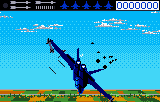
Blue Lightning (USA) (Demo)
Blue Lightning (USA) (Demo): Lynx Simulation
Blue Lightning is a combat flight simulator that originally hit the Atari Lynx in 1989. This particular file is a demo version of that game, giving you a taste of the aerial action. It was developed by Epyx and published by Atari Corp for the Lynx handheld.
You step into the cockpit of a rookie fighter pilot in the Blue Lightning squadron. The mission is to take down General Drako, a corrupt military leader who has built a crime empire. You'll fly multiple military aircraft across various missions, engaging enemy fighters and ground targets in classic flight sim fashion.
Even as a demo, it's a solid example of what the Lynx could do with 3D-style flight combat. It offers a quick session of arcade-style flying that still holds up for retro enthusiasts. If you want to see how flight sims worked on a small screen in the early 90s, this is worth checking out.
How to Play Blue Lightning (USA) (Demo) Online
Getting Started
When you launch the demo, you'll likely see a title screen followed by a brief mission briefing. Use the D-pad to navigate menus and the A button (X key) to confirm your choice. The core loop involves piloting your aircraft, dodging enemy fire, and taking down targets with your weapons. Keep an eye on your altitude and speed - both are critical in combat.
This demo cuts off after a set time or number of missions, so focus on learning the controls and getting a feel for the flight model. The game uses a first-person cockpit view with a heads-up display showing your heading, speed, and weapon status. Practice maneuvering with the D-pad and firing with the B button (S key) to take out enemies. If you crash or get shot down, you'll return to the main menu.
Since this is a demo, expect limited content, but it's enough to understand the basics of the full game. The Lynx version runs smoothly and the controls are responsive, so don't be afraid to experiment with different aircraft if the demo allows.
Blue Lightning (USA) (Demo) Keyboard Controls
Controls
- Arrow Keys: D-Pad / Movement
- X: A button
- S: B button
- Q: Option 1
- E: Option 2
- Enter: Pause





Comments (0)